Rear Hitch - Use the Depth Control Lever
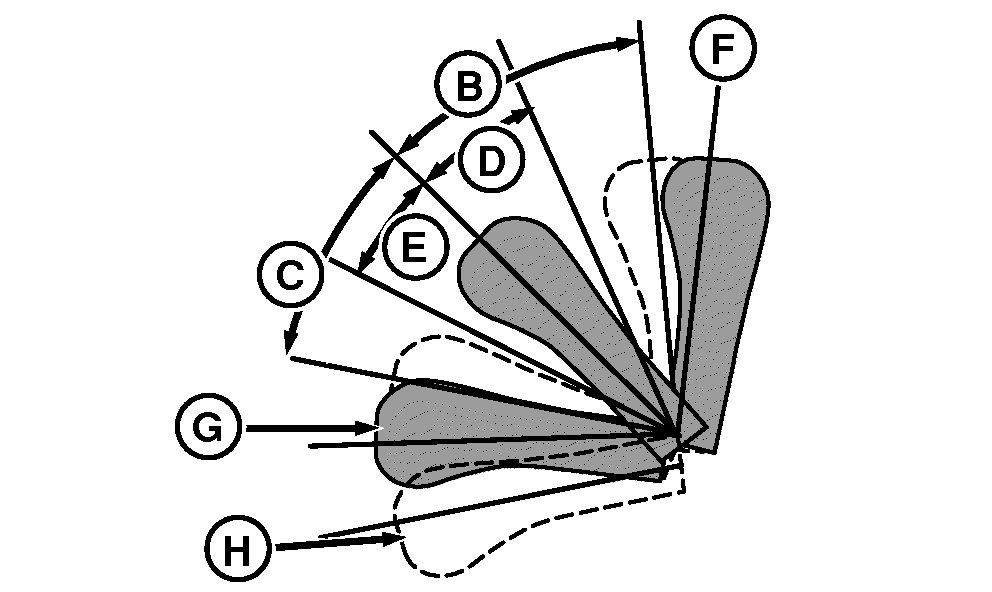
Movements of depth control lever (A) in areas (D) and (E) cause the rear hitch to be raised or lowered. Raise or lower rate depends on how far lever (A) is moved from center position. Push lever (A) down to lower the rear hitch; pull lever up to raise the rear hitch.
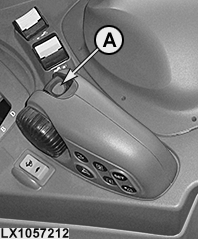
LX1057212-UN-09SEP13
Side Console
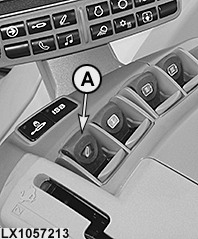
LX1057213-UN-22JAN14
CommandARM™
RXA0104294-UN-11AUG09
Depth Control Lever
LX1057214-UN-06SEP13
Side Console
LX1057215-UN-22JAN14
CommandARM™
A - Depth Control Lever (Raise, Lower and Float Position)
B - Raise Rear Hitch Quickly
C - Lower Rear Hitch Quickly
D - Raise Rear Hitch Slowly
E - Lower Rear Hitch Slowly
F - Click Position, Raise
G - Click Position, Lower
H - Float Position (Detent)
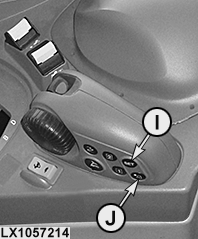
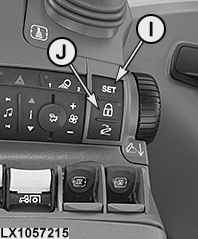
I - SET Button, Save Operating Depth
J - Transport Lock/Hitch Dampening
- Lever (A) will not raise rear hitch above upper height limit, but will move hitch below the saved depth setting.
- A short duration ”flick” of lever (A) out of neutral to position (D) or (E) will change hitch position incrementally by a small amount.
Set operating depth
Use lever (A) to move the rear hitch to desired operating depth, then press SET button (I) to save the value.
- Every time the SET button (I) is pressed, the previous operating depth is overwritten.
Click positions of lever (A)
When lever (A) is pulled to click position (F) and then released, the rear hitch rises to its upper set limit. When pushed into click position (G) and released, the rear hitch lowers to saved operating depth.
- If lever (A) is held in forward click position while lowering, the rear hitch lowers beyond saved operating depth. If tractor is moving, the rear hitch rises to saved operating depth when lever (A) is released.
- Operating depth can be set by moving lever (A) in areas (B) and (C). If lever (A) is pushed to the forward click position and released, the rear hitch returns to the saved operating depth.
Float position (detent position)
Float position (H) holds the rear hitch lower valve open continuously. This allows an implement with gauge wheels to follow ground contours and makes it easier to dismount an implement. See also "Rear Hitch - Use the Float Position" in this section.
Transport lock/hitch dampening
 CAUTION: To prevent injury and equipment damage, set the transport
lock/hitch dampening to ON before transporting.
CAUTION: To prevent injury and equipment damage, set the transport
lock/hitch dampening to ON before transporting.
Before transporting or performing operations that do not require the use of the rear hitch, raise the rear hitch using lever (A) and then press the transport lock/hitch dampening button (J). This locks the rear hitch and activates hitch dampening.
- Lever (A) is disabled so hitch cannot be lowered accidentally; however it can be raised back up to locked position as soon as lever (A) is moved to the "raise" click position (F) and held there.
- If the rear hitch sinks while the engine is shut off, the rear hitch can be returned to its previously set locked height by moving lever (A) to the "raise" click position (F) and holding it there while the engine is running.
- Hitch dampening interrupts tractor pitching/rocking that can occur when transporting rear hitch-mounted equipment. See also Rear Hitch - Hitch Dampening in this section.
To unlock rear hitch and turn dampening off, press transport lock /hitch dampening button (J) again.
|
OULXA64,000307F-19-20140630 |