Rear Hitch - Set Operating Depth
LX1057246-UN-26SEP13
Side Console
LX1057213-UN-22JAN14
CommandARM™
LX1057247-UN-23JAN14
CommandARM™
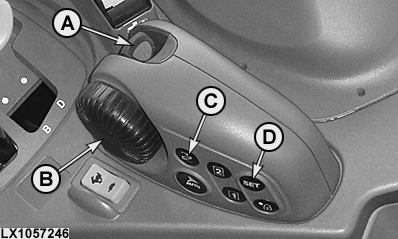
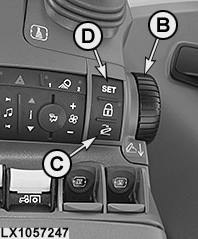
A - Depth Control Lever (Raise, Lower and Float Position of Rear Hitch)
B - Control Knob, Depth Control (Raise and Lower the Rear Hitch)
C - Button, Select Saved Operating Depth / Quick-Lower
D - SET Button
IMPORTANT: Changes to operating depth are immediate.
Push depth control lever (A) forward or turn control knob (B) forward and set the desired operating depth. Use the SET button (D) to save the set operating depth.
After an implement has been raised, pushing lever (A) forward again to its click position (perceptible resistance) or pressing the button (C) causes the rear hitch to drop automatically again to the saved operating depth.
NOTE: When the rear hitch is lowered using button (C), the rear hitch drops immediately and at the set rate of drop to the previously set operating depth. To activate the quick raise/lower function, press and hold key (C) while the tractor is driving. The quick raise/lower function brings the rear hitch to a position slightly below the preset operating depth, and after the button is released the hitch is automatically brought back to the preset operating depth. This allows improved tillage in compacted soils (e.g. at the headland).
A saved operating depth can be exceeded using control knob (B) or by pressing lever (A) in the position for lowering.
NOTE: Setting an operating depth below the set operating depth functions only while the tractor is moving.
|
OULXA64,0003090-19-20150619 |