Rear Hitch - Adjust Slip Sensitivity (if equipped)
NOTE: Slip sensitivity is available only in conjunction with the radar sensor. Slip sensitivity setting is independent of the draft control setting. Draft control must be activated.
|
Response Setting Guidelines1 |
|
|---|---|
|
Chisel Plow .............. |
2—4 |
|
Subsoiler.............. |
5—7 |
|
Moldboard Plow.............. |
7—9 |
|
V-Ripper.............. |
8—10 |
-
Press rear hitch button (A).
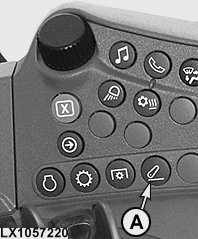
LX1057220-UN-22JAN14Side Console
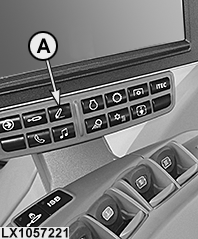
LX1057221-UN-22JAN14CommandARM™
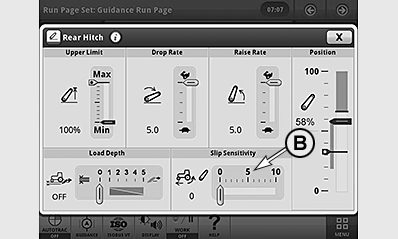
LX1056994-UN-24NOV14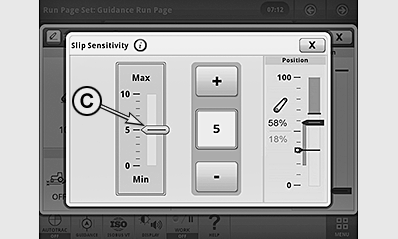
LX1057241-UN-10SEP13A - Rear Hitch Button
B - Slip Sensitivity Indicator
C - Adjust Slip Sensitivity
-
Select display field for slip sensitivity (B).
-
Use the +/— buttons to set the desired slip sensitivity (C).
Slip sensitivity is dependent on this setting, but also varies with soil conditions.
In relation to the condition of the soil, slip sensitivity controls the extent to which the implement is raised when wheel slippage occurs.
|
1 Appropriate
setting will depend on implement type, soil conditions, and tractor
equipment.
|
OULXA64,0003095-19-20141201 |