Multi-Function Lever, Electrical
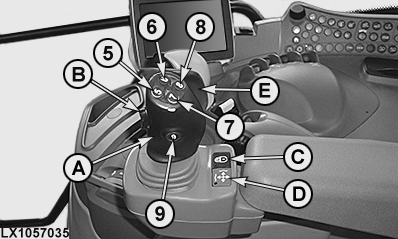
LX1057035-UN-23JUL13
Multi-Function Lever, without CommandARM™
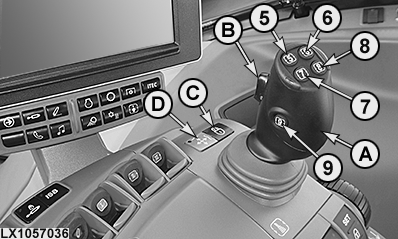
LX1057036-UN-21JAN14
Multi-Function Lever, on CommandARM™
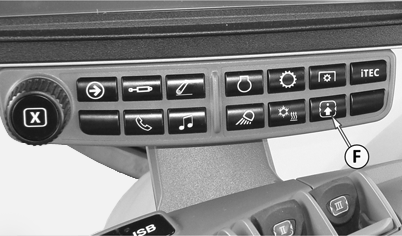
LX1057412-UN-02JUL14
Button for Requesting Current Status of Button Assignment
5 - Gear-Shift Button, Change Up (Default Assignment)
6 - Button for Activating Front-Loader Dampening (Default Assignment)1
7 - Gear-Shift Button, Change Down (Default Assignment)
8 - Memo Button or Button for Diverter Valve 2 (Default Assignment)2 3
9 - Button for Diverter Valve 1 (Default Assignment)2
A - Multi-Function Lever
B - Rocker Switch, Raise/Lower (Default Assignment)
C - Lock Button, Multi-Function Lever ON/OFF
D - Indicator Light, Multi-Function Lever Active
E - Hand Flap4 for Activating the Multi-Function Lever
F - Button for Setting Up the Controls
 CAUTION: To avoid sudden movements and possible accidents, never
operate front loaders in combination with iTEC™.
CAUTION: To avoid sudden movements and possible accidents, never
operate front loaders in combination with iTEC™.
CAUTION: On tractors with electrically actuated multi-function
lever, buttons (5) to (9) and rocker switch (B) can be activated or
disabled. Press "Controls Setup" button (F) to find out how the buttons
are currently assigned. Misuse may result in accidental death.
IMPORTANT: The multi-function lever and the SCVs must be locked when driving on public roads.
IMPORTANT: On front loaders with return-to-position (RTP), button (8) is used to toggle the setpoint range. See also “RTP — Front Loader with Return-to-Position Function (RTP)” section.
IMPORTANT: If the multi-function lever is to be used to operate a loader, activate “Loader Mode” on the page for “Controls Setup” in the CommandCenter™.
For more information, see “Multi-Function Lever, Electrical" in the “Additional Equipment - Hydraulic System” section.
|
1 European Edition Only
|
OULXA64,00030B5-19-20150601 |