iTEC™ - CommandCenter™ Pages Description and Functions
iTEC™ Main Page

RXA0131089-UN-26FEB13
Menu → Tractor Settings Tab → iTEC™ Icon
RXA0131995-UN-23APR13
iTEC™ Main Page
- Select Menu.
- Select Tractor Settings tab
- Select iTEC™ icon.
-
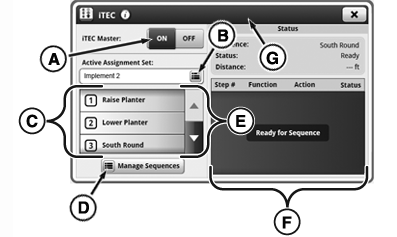
A — iTEC™ Master Toggle:
Toggle iTEC™ ON/OFF.
-
B — Button for active sequence set:
Select or create a sequence set.
-
C — Assignments List:
List of sequences assigned to buttons.
-
D — Manage Sequences Button:
Edit sequence and assign buttons.
-
E — Scroll Bar:
Scroll up or down.
-
F — Status List:
Shows status of each iTEC™ sequence step as sequence progresses.
-
G — Title Bar:
Pressing on Title Bar will access application title, help button, and advanced settings (if applicable).
|
OULXA64,00030D3-19-20131213 |