iTEC™ Status Area
iTEC™ Status Area
RXA0131243-UN-08MAR13
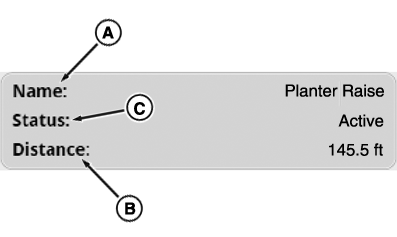
Status Area of the Main Page
-
A — Name:
Name of sequence that is currently running.
-
B — Distance:
Distance counter while an iTEC™ sequence is running.
-
C — Status:
Indicator of current iTEC™ status.
-
*Off - No sequence execution possible.
-
Ready - Waiting for button to which
a sequence is assigned to be pressed.
-
Active - Execution of an iTEC™
sequence active.
-
*Cruise control - Engine speed is
out of range.
-
*Park - Transmission indicates that
park lock is engaged.
-
*Operator Presence - No operator present,
no iTEC™ execution allowed.
-
*Speed low - Travel speed is less
than 0.5 km/h, execution is paused.
-
Complete - Sequence successfully completed.
-
Cancelled - Execution of the sequence
has been cancelled by the operator or there is a condition for canceling
the active execution.
- Error - One or several sequence steps has not been carried out.
-
*Off - No sequence execution possible.
*Sequence execution cannot be started if any of the conditions exist.
iTEC™ Manage Sequence Page

RXA0131089-UN-26FEB13
Menu → Tractor Settings Tab → iTEC™ Icon

RXA0129723-UN-06MAR13
Manage Sequences Button
RXA0131143-UN-26FEB13
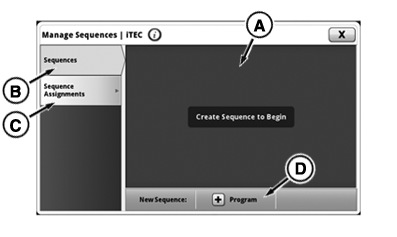
iTEC™ Manage Sequences Page
-
Select Menu.
-
Select Tractor Settings tab
-
Select iTEC™ icon.
-
Press Manage Sequences button.
-
A — iTEC™ Content Section:
Available sequences or sequence assignments are displayed.
-
B — Sequences Tab:
Show available, delete saved, edit saved, or add new sequences.
-
C — Sequence Assignments Tab:
Show assigned sequences or give sequence assignment.
-
D — Program Button:
Manually program sequence.
|
OULXA64,00030D4-19-20140729 |