Selective Control Valves, Electronic - Control Levers (CommandARM™)
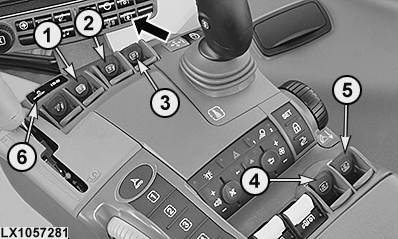
LX1057281-UN-23JAN14
Button for Requesting Current Status of Assignment
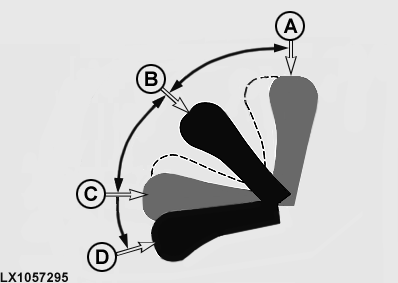
LX1057295-UN-19SEP13
1 - Control Lever, SCV I
2 - Control Lever, SCV II
3 - Control Lever, SCV III
4 - Control Lever, SCV IV
5 - Control Lever, SCV V
6 - Lock Button, Selective Control Valves
A - Extend (Click Position)
B - Neutral Position
C - Retract (Click Position)
D - Float Position (Detent)
 CAUTION: All SCVs can also be operated through the multi-function
lever, provided they are assigned to the multi-function lever. Before
using, press button (see arrow) to find out the current assignment.
Misuse may result in accidental death. See “Multi-Function Lever,
Electrical" in this Section.
CAUTION: All SCVs can also be operated through the multi-function
lever, provided they are assigned to the multi-function lever. Before
using, press button (see arrow) to find out the current assignment.
Misuse may result in accidental death. See “Multi-Function Lever,
Electrical" in this Section.
CAUTION: To avoid personal injury, ensure that hoses are not
reversed. If hoses are reversed, cylinder extends when it should retract.
IMPORTANT: When driving on roads, or when the SCV lever is not required in neutral position, activate the lock button of the SCVs (6).
NOTE: Moving the SCV lever to its click position activates the selected function in relation to the valve's preset flow rate and flow time. The SCV levers do not remain in the extend and retract click positions unless they are physically held there by the operator.
NOTE: Float can be used to allow hydraulic motors to coast when shutting down implement.
The SCV levers may be moved to 4 final positions.
A — Extend (click position)
If the lever is moved to the extend click position and released,
the lever returns to neutral and the hydraulic cylinder extends in
accordance with its preselected flow rate and preset flow time.
A/B — Position between neutral and
extend click positions
If the lever is moved between
neutral and the extend click position, the cylinder extends slowly.
The further the lever is moved towards the click position, the faster
the hydraulic cylinder extends. If the lever is released, the lever
returns to neutral and the hydraulic cylinder is held in position.
B — Neutral position (between retract
and extend)
In neutral position, the hydraulic cylinder
is held in position.
Lever returns to center position (neutral) when released, unless it is detented in float position (D).
B/C — Position between neutral and
retract position
If the lever is moved between neutral
and the retract click position, the cylinder retracts slowly. The
further the lever is moved towards the click position, the faster
the hydraulic cylinder retracts. If the lever is released, the lever
returns to neutral and the hydraulic cylinder is held in position.
C — Retract (click position)
If the lever is moved to the retract click position and
released, the lever returns to neutral and the hydraulic cylinder
retracts in accordance with its preselected flow rate and preset flow
time.
D — Float position (detent position)
If the lever is moved beyond the retract click position
and detented in the float position, the piston of the hydraulic cylinder
can move freely and the attached implement can follow the ground contour.
NOTE: If the lever is released in a click position, the lever returns automatically to neutral.
NOTE: If additional external valves are used, move the control lever to neutral when shutting off each hydraulic function.
NOTE: To release hydraulic pressure in the implement, move the lever to float position (D) while engine is running.
|
OULXA64,00030FB-19-20141201 |