Multi-Function Lever, Electrical — Controls
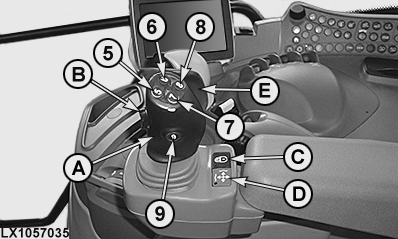
LX1057035-UN-23JUL13
Multi-Function Lever, without CommandARM™
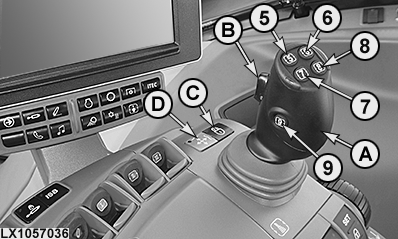
LX1057036-UN-21JAN14
Multi-Function Lever, on CommandARM™
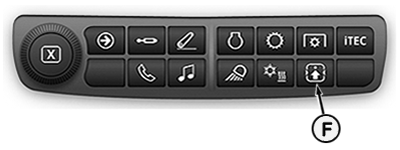
LX266811-UN-29APR16
5 - Gear-Shift Button, Changing Up
6 - Button for Activating Front-Loader Dampening1
7 - Gear-Shift Button, Changing Down
8 - Memo Button or Button for Diverter Valve 21 2
9 - Button for Diverter Valve 11
A - Multi-Function Lever
B - Raise/Lower Rocker Switch
C - Lock Button, Multi-Function Lever ON/OFF
D - Indicator Light, Multi-Function Lever Active
E - Hand Flap3 for Activating the Multi-Function Lever
F - Button for Controls Setup
 CAUTION: To avoid sudden movements and possible accidents, never
operate front loaders in combination with iTEC™.
CAUTION: To avoid sudden movements and possible accidents, never
operate front loaders in combination with iTEC™.
CAUTION: If the multi-function lever is activated with button
(C), the functions of buttons (5) to (9) are automatically activated.
Press button (F) to view current button assignment. Misuse may result
in accidental death.
IMPORTANT: The multi-function lever on the right armrest may contact the side console if seat is in full right-hand swivel position. Check seat swivel, seat height and seat adjustment (forward/backward) to avoid contact.
IMPORTANT: When working with the multi-function lever, observe the following:
- Always lock the multi-function lever and the SCVs when driving on public roads (see the following pages).
- Always enable loader mode before operating the front loader (see following pages). If this is not done, unwanted functions may be triggered accidentally.
- On front loaders with return-to-position (RTP), button (8) is used to toggle the setpoint range. See also “Front Loader with Return-to-Position Function (RTP)” in section "RTP — Front Loader with Return-to-Position Function”.
Multi-function lever (A) permits two selective control valves to be operated at the same time. By means of rocker switch (B) an additional SCV can be operated. If the rocker switch is moved beyond the perceptible kiss pressure (click position) and then released, the hydraulic cylinder of the connected implement is retracted or extended in accordance with the preset flow time and flow rate.
Depending on equipment, the multi-function lever may be operated in different operating modes. The operating modes are enabled and disabled using the CommandCenter™. The enabled mode can only be operated if the multi-function lever has been unlocked at button (C).
Variable functions can be assigned to the lever directions fore/aft and left/right and to the rocker switch (B) on the multi-function lever. Press button (F) to view current button assignment.
The changing-up and changing-down functions are assigned to the gear-shift buttons (5) and (7). This only applies for the following transmissions:
- PowrQuad™ PLUS transmission
- AutoQuad™ PLUS transmission
- DirectDrive transmission
For further information on layout, functions, lock functions and operating modes of the multi-function lever, see the following pages.
|
1 European edition only
|
OULXA64,00030FD-19-20160504 |