Selective Control Valves, Electronic - Extend and Extend Click Position
Extend
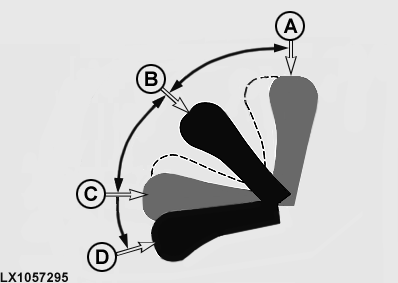
LX1057295-UN-19SEP13
A - Extend (Click Position)
B - Neutral Position
C - Retract (Click Position)
D - Float Position (Detent)
If the lever is moved between neutral (B) and extend click position (A), the cylinder extends slowly. The further the lever is moved towards click position (A), the faster the hydraulic cylinder extends. If the lever is released, the lever returns to neutral and the hydraulic cylinder is held in position.
NOTE: Flow time setting is ignored in extend position.
Extend Click Position
Move lever to extend click position (A) and release it; the lever return to neutral and the hydraulic cylinder extends in accordance with its preset detent time and preselected flow rate.
The flow rate setting at the SCV page remains in force.
Flow time of the flow rate starts when the lever is moved to the click position. Flow time should be adjusted so cylinder is fully extended when time elapses.
NOTE: If lever is not returned from the click position to neutral in less than 0.8 seconds, the settings associated with the click position are canceled.
The settings associated with the click position can be canceled by moving the lever out of neutral.
|
OULXA64,0003103-19-20141030 |