Selective Control Valves, Electronic - SCV Main Page
 CAUTION: To avoid sudden movements and possible accidents, never
operate front loaders in combination with iTEC™.
CAUTION: To avoid sudden movements and possible accidents, never
operate front loaders in combination with iTEC™.

RXA0128092-UN-10SEP12
“Menu Button” → “Tractor Settings” Tab → “SCV”
LX1057424-UN-28JUL14
SCV Page
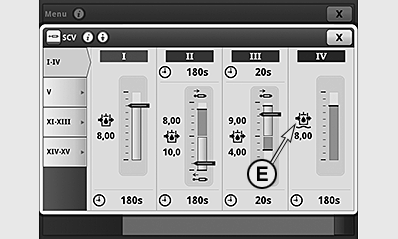
A - SCV Standard Mode
B - SCV, Independent Mode, Extend
C - SCV, Independent Mode, Retract
D - SCV in Float Position
E - Float Position Symbol
- Select “Menu Button”.
- Select “Tractor Settings” tab.
- Select “SCV”.
Each SCV can be operated in two different modes:
• Standard mode, represented for SCV I (A).
• Independent mode, represented for SCV II (B) and III (C).
If the control lever of a SCV is locked into float position, the symbol (E) for float position is displayed as for SCV IV (D).
|
OULXA64,0003106-19-20141201 |