Selective Control Valves, Electronic - Setting Standard Mode
RXA0128092-UN-10SEP12
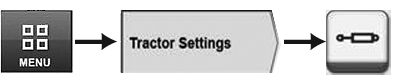
“Menu Button” → “Tractor Settings” Tab → “SCV”
LX1057321-UN-14OCT13
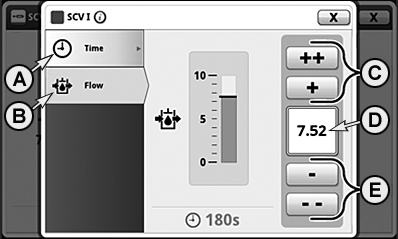
SCV — Setting Quantity and Duration of Flow
A - Time Tab
B - Flow Tab
C - “Increase Time/Flow” Buttons
D - Input Box
E - “Decrease Time/Flow” Buttons
The flow rate and the flow time can be set for SCVs in standard mode for extending as well as for retracting.
NOTE: Moving the SCV lever to its click position activates the selected function in relation to the valve's preset flow rate and flow time.
-
Select “Menu Button”.
-
Select “Tractor Settings” tab.
-
Select “SCV”.
-
Select Standard SCV module.
-
Select Flow tab (B).
NOTE: At input box (D), the flow rate is displayed in increments of 0.04 from 0.04 to 10.
-
To adjust desire flow rate, press increase button (C) or decrease button (E).
-
Select Time tab (A).
NOTE: Flow time is displayed under the “Time” tab in the following increments:
- from 0 to 10 seconds in increments of 1 second
- from 10 to 20 seconds in increments of 2 seconds
- above that as 25, 30, 40, 50, 60, 90, 120 and 180 seconds
- or “C” for “Continuous” (continuous)
-
Press increase button (C) or decrease button (E) to set desired flow rate.
|
OULXA64,0003107-19-20141201 |