Turn Display On and Off
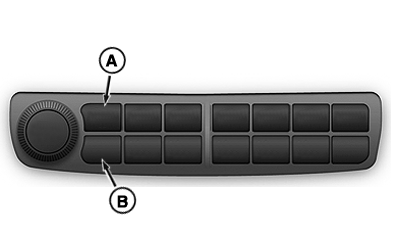
RXA0148512-UN-25JUN15
Navigation Bar
A - Upper Button
B - Lower Button
The Generation 4 CommandCenter™ display is switched on and off by the tractor's key switch.
- Warm boot occurs when CommandCenter™ display has been run within last 24 hours. Display rests in hibernation state for that time. Display powers up quickly (approx. 10 seconds).
-
Cold boot occurs if display is not
operated for 24 hours or more, or if unswitched power has been disconnected.
During this period, display shuts down completely to conserve battery
power. Next power up will take approximately 60 seconds.
NOTE: After turning off engine, avoid turning key switch back
on until display screen has gone black.
-
Hard reset is required when display
is unresponsive for more than a few minutes under normal operating
conditions.
Perform hard rest by pressing left-most upper and lower buttons (A and B), of navigation bar, simultaneously for 5 seconds. If display does not reset, pull fuse 9 located in load center fuse panel and replace after 5 seconds. For more information on load center fuse panel, see Load Center Fuses in Electrical System Service section of this Operator’s Manual. If problem persists, see your John Deere™ dealer.
|
CommandCenter is a trademark of Deere & Company John Deere is a trademark of Deere & Company |
OULXA64,000312A-19-20160226 |