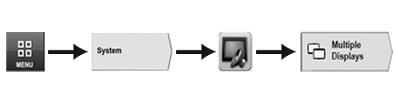
Navigate to the Section Multiple Displays
 CAUTION:
RXA0130611-UN-21FEB13
Menu → System Tab → Display & Sound Icon → Multiple Displays Tab
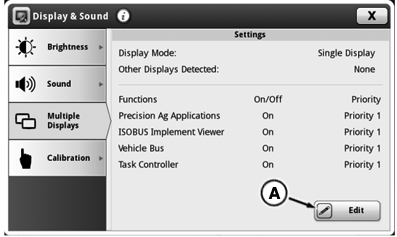
RXA0134343-UN-01AUG13
Multiple Displays Page
A - Edit Button
Implement DetectedImproper operation can cause unintended implement movement.
To avoid death or serious injury to a bystander, understand how this display operates the functions of the implement.
Read and understand the implement Operator's Manual.
Message occurs when system detects an ISOBUS implement. For more information, read Operator Manuals for ISOBUS Implements.
In some cases it may be necessary to operate with more than one ISO terminal display. Configure the CommandCenter™ so that it recognizes a second ISO display and functions together with it.
-
Select Menu.
-
Select System tab.
-
Select Display and Sound icon.
-
Select Multiple Displays tab.
|
CommandCenter is a trademark of Deere & Company |
OULXA64,000313A-19-20160226 |