External Sources – Use the Premium Radio
LX1057123-UN-29JUL13
Auxiliary and USB Inputs
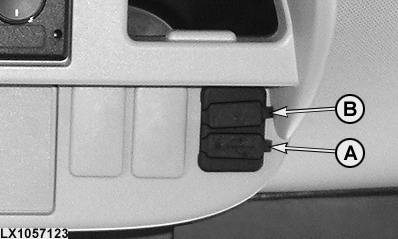
A - USB Input
B - AUX Input
External audio sources can be connected using AUX1REAR port at the rear of the radio system or using the practical port located near the operator/stowage compartments. Sources can be connected using Bluetooth functions. The operator may use the ports to charge certain external audio sources. Examples of external audio sources include portable CD player, MiniDisc player, or MP3 player.
NOTE: Some external audio sources are not supported. For example, iPhone and iPad exceed the current limits and shut off the driver.
Activate AUX input
Connect external audio source and press the SRC button several times until AUX1REAR is displayed.
NOTE: The external audio source can only be selected if an audio device is connected to the external AUX input.
Adjust AUX input volume
The volume for a connected external audio source can be adjusted to the volume in radio mode.
NOTE: The AUX input volume can only be adjusted after selecting the input as an audio source using the SRC button.
- Press the SRC button several times until the desired audio source is displayed.
- Press MENU button. GAIN and the current setting are displayed.
- Turn the volume regulator counterclockwise or clockwise to adjust the column from -9 to +9, and 0 corresponds to the column setting selected in radio mode.
- Press the MENU button several times to exit the menu.
Set up Bluetooth®
Following steps must be performed before Bluetooth® can be used:
NOTE: For further instructions on how to pair cell phone/audio source and to transfer data, see this section.
- Turn Bluetooth® function on.
- Select connection type (phone/audio).
- Pair cell phone/external audio source.
- Select paired cell phone/external audio source for connection.
- Transfer cell phone/external audio source data.
As soon as cell phone/external audio source has been paired successfully, phone calls/audio can be received and accepted via the radio system.
NOTE: The Bluetooth® connection is only relevant for cell phones/external audio sources which are Bluetooth® enabled.
Listen to audio using headphones
To play audio from external audio devices using headphones, the operator can enable the Bluetooth® connection to transmit audio signals or directly plug the headphone output of the implement into the AUX input located on the cab port.
|
OULXA64,00031F7-19-20140723 |