Use the Premium Radio
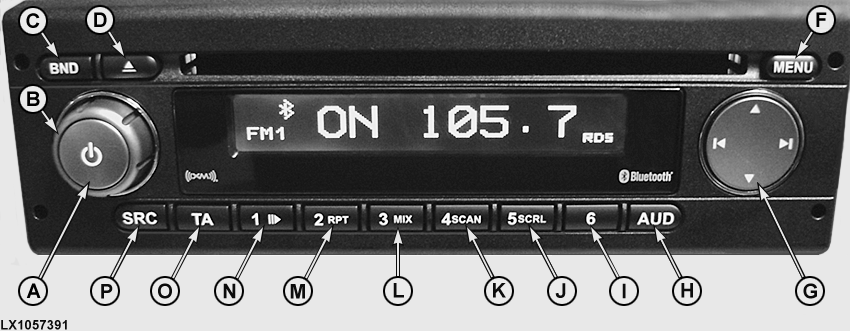
LX1057391-UN-13JAN14
Radio with CD Player
- A—ON/OFF Button: Press briefly to turn radio ON/OFF. Press briefly during operation to mute radio.
- B—Volume Control: Turn clockwise to increase the volume and counterclockwise to reduce it.
- C—BND Button: Press briefly to select memory level or wave band. Press and hold to start Travelstore™ function.
- D—CD Eject Button: Press to eject CD.
- E—Display: Displays current radio use/function.
- F—Menu Button: Access menu for basic settings.
- G—Multi-Function Rocker Switch: Use to navigate within display and switch functions. Press left or right to find next available station.
- H—AUD Button: Press briefly to access audio menu to adjust bass, middle, treble, balance and loudness. Press and hold to restore factory sound settings (treble and bass for currently used audio source only).
- I—Station Button 6: Press to save current station, or to switch between indication of elapsed and remaining playing time of current track.
- J—Station Button 5/SCRL: Press to save current station. When CD or MP3 is in use, press to turn scrolling track information on display ON/OFF.
- K—Station Button 4/SCAN: Press to save current station. When CD or MP3 is in use, press to play all tracks for approximately 10 seconds each until the button is pressed again.
- L—Station Button 3/MIX: Press to save current station. When CD or MP3 is in use, press to play all tracks in random order until the button is pressed again.
- M—Station Button 2/RPT: Press to save current station. When CD or MP3 is in use, press to repeat current track until the button is pressed again.
- N—Station Button 1/Play or Pause Button: Press to save current station. When CD or MP3 is in use, press to pause current track. Press again to play.
- O—TA Button: Press to switch from user/audio menus to current source, exit radio scan functions, turn priority for traffic announcements ON/OFF, and cancel traffic messages (Europe only).
- P—SRC Button: Use this button to select between radio or AUX as source (and depending on the model, CD, USB and XM). The prerequisite is that a data carrier is inserted or connected and the device is switched on.
|
OULXA64,00031F8-19-20131218 |