Instrument Panel and Indicator Lights — AutoPowr™ Transmission
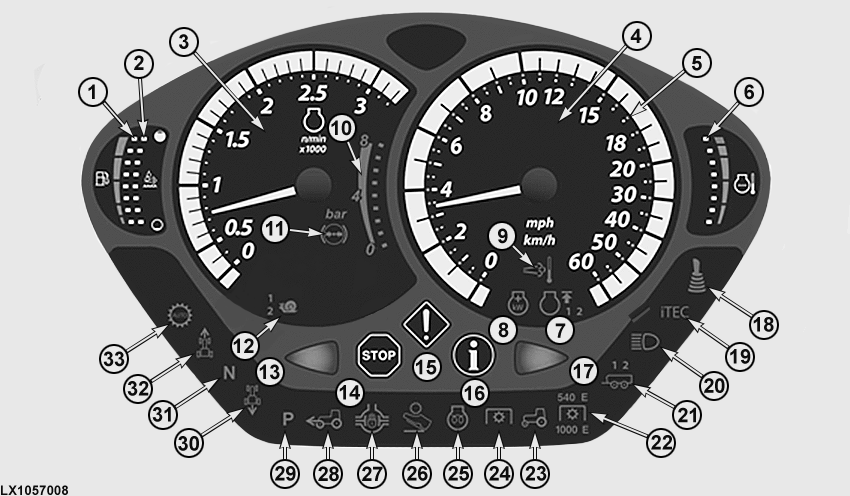
LX1057008-UN-10JUN13
1 - LED for fuel level in tank - Informs operator how much fuel is left in the tank.
2 - LED for DEF tank - Informs operator how much DEF is left in the tank.
3 - Tachometer - Indicates crankshaft speed in revolutions per minute.
4 - Speedometer - Indicates travel speed in mph or km/h.
5 - LEDs around the speedometer indicate preselected speed band.
6 - LED for coolant temperature - Monitors coolant temperature.
7 - Indicator light for FieldCruise™. The icon and the relevant figure light up when FieldCruise™ is activated at user setting 1 or 2.
8 - Indicator light for IPM (Intelligent Power Management). The icon lights up when IPM is activated.
9 - Indicator light for exhaust filter cleaning - Comes on during the cleaning phase.
10 - Indicates current air pressure in trailer air brake.1
11 - Brake pressure warning light - Shines red until the trailer air brake has reached operating pressure. Then the icon shines white.1
12 - This icon or the relevant figure comes on when the AutoPowr™ / IVT™ is in creeper mode or speed range 1 or 2 is enabled.
13 - Flashing indicator light on left - Starts flashing when turn-signal lights for left turn or hazard warning lights are switched on.
14 - Red STOP light - Flashes when a serious malfunction occurs. Shut off the engine IMMEDIATELY. Review the error message in the CommandCenter™ and eliminate the cause.
15 - Yellow CAUTION light - Flashes when a malfunction occurs (review the error message in the CommandCenter™). This light also flashes if the emergency brake is applied with the engine running and the reverse drive lever set to any position other than neutral.
16 - Blue INFO Light - Lights up when there is a fault in an electrical component associated with the hydraulic system or transmission. Review the error message in the CommandCenter™ and eliminate the cause. See your John Deere™ dealer, if necessary.
17 - Flashing Indicator Light on Right - Starts flashing when turn-signal lights for right turn or hazard warning lights are switched on.
18 - Indicator Light for ISO Aux Function - is lit when ISOBUS control is activated.
19 - iTEC™ Indicator Light - is lit when iTEC™ is switched on.
20 - High-beam indicator light - Comes on when headlights are switched on at high beam.
21 - Trailer turn-signal indicator light - Flashes if the tractor has one or two trailers. The indicator light starts flashing when turn-signal lights or hazard warning lights are switched on.
22 - Rear PTO indicator lights - Together with the light (23), they indicate the currently selected speed of the rear PTO.
23 - Comes on together with (22) or (24) to indicate whether front or rear PTO is switched on.
24 - Front PTO indicator light - Comes on together with light (23) whenever the front PTO is switched on.1
25 - Prewarm indicator light - Comes on when the ignition switch is turned one position to the right. Do not start the engine before the light has turned off.
26 - Indicator light for accelerator pedal mode - Comes on as soon as accelerator pedal mode is activated.
27 - Differential lock indicator light - Comes on when differential lock is switched on.
28 - Front-wheel drive indicator light - Comes on when front-wheel drive is switched on.
29 - Park position indicator light - Comes on whenever the reverse drive lever is in park position.
30 - Reverse travel indicator light - Comes on whenever the reverse drive lever is in reverse position.
31 - Neutral indicator light - Comes on whenever the reverse drive lever is in neutral position.
32 - Forward travel indicator light - Comes on whenever the reverse drive lever is in forward position.
33 - Indicator light for Auto transmission mode - Comes on whenever the automatic mode of the transmission is activated.
Bulb test: As the engine is started, all the lights (icons) should glow for about 1 second. If not, a defective LED or blown fuse may be the cause. Replace part.
NOTE: Only those lights relating to functions with which the tractor is equipped will light up.
The indicator lights go out as soon as the engine is running.
NOTE: The travel speed can be displayed in km/h or MPH. This setting can be made at the CommandCenter™. In this section, see the Units of Measurement screen in CommandCenter™ settings.
|
1 European Edition Only
|
OULXA64,00033CF-19-20141217 |