Electronic Service Check (If Equipped)
RXA0147925-UN-13APR15
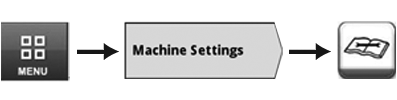
Menu → Machine Settings Tab → Maintenance & Calibrations Icon
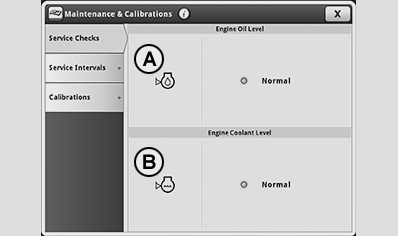
LX1056998-UN-26NOV14
Display green: normal level
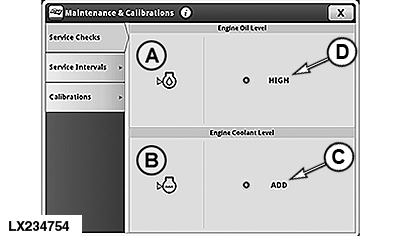
LX234754-UN-26OCT15
Display red: level too high or too low
The electronic service check provides a fill-level check for the engine oil and the engine coolant that can be carried out before the first start of the engine. To carry out the electronic service check, call up the run page for Maintenance & Calibration.- Select Menu.
- Select Machine Settings tab.
- Select icon for Maintenance & Calibrations.
- Select Service Checks tab.
Following test points are available:
A — Engine oil level
B — Engine Coolant Level
IMPORTANT: The fill level indicator functions properly only when the following is observed:
- Tractor stands on level ground and is in horizontal position.
- The engine has been shut down for at least 40 minutes. The waiting time depends on the temperature and is displayed in the CommandCenter™.
A light indicates the status of a respective machine test point. A green light indicates normal level. A red light indicates either a high level or low level.
IMPORTANT:
• The message “Fill level too low” (C) means that the oil level is nearing the MIN marking of the oil dipstick.
• The message “Fill level too high” (D) means that a high oil level is being measured, which may even be higher than the MAX marking.
Both messages (C) and (D) may make it necessary to adjust the oil level. Check by measuring the oil level with the oil dipstick and adjust the oil level if necessary.
If no measurement is possible, it may be due to one of the following causes:
- Engine ON.
- Engine has not been shut down long enough and the liquids have not settled completely yet. Wait at least 40 minutes, depending on the temperature.
NOTE: Possible causes will be displayed on the CommandCenter™.
RXA0126688-UN-07JUN12
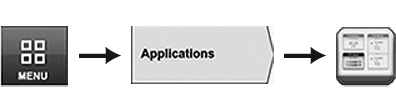
Menu → Applications Tab → Layout Manager Icon
LX1057479-UN-26NOV14
Softkey with Status Display on the Shortcut Bar
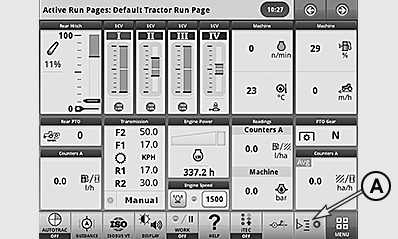
A softkey (A) with a status indicator for the electronic service check can be added to the shortcut bar on the main page.- Select Menu.
- Select Machine Settings tab.
- Select Layout Manager icon.
- Select the appropriate softkey and add.
• If the status indicator of the softkey is lit up green, then all fill levels are OK.
• If the status indicator of the softkey is lit up red, then one or both fill levels are too high or too low.
• If the status indicator of the softkey is not lit, then checking the fill levels is not possible.
IMPORTANT: If the status indicator of the service check is lit red or not at all, then call up the electronic service check page and observe the information in the CommandCenter™.
|
OULXA64,00034D0-19-20160229 |