Multi-Function Lever, Electrical — Controls Setup
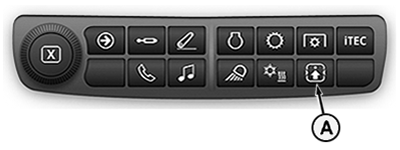
LX266812-UN-29APR16
Button for "Controls Setup"
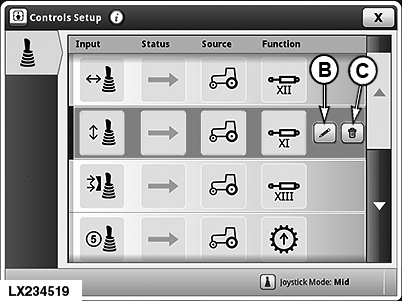
LX234519-UN-10FEB15
"Controls Setup" Page (Default Assignment) Shown
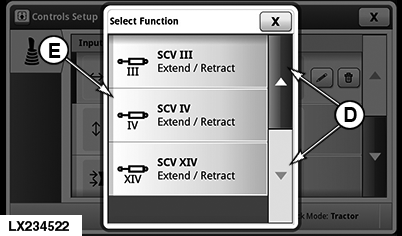
LX234522-UN-10FEB15
Select “Function”
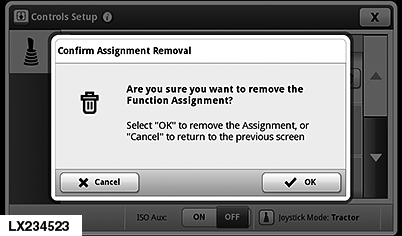
LX234523-UN-10FEB15
Confirm the Removal of a Function
A - Button for Controls Setup
B - Edit Function
C - Delete Function
D - Navigation Button
E - Select Function
When the multi-function lever is activated, the functions of buttons (5) to (9), as well as the rocker switch (B), are automatically activated. Press button (F) to view current button assignment. Misuse may result in accidental death.
IMPORTANT: The functions of buttons (5) to (9) of the multi-function lever are fixed presets. If equipped, these functions are automatically displayed and activated.
|
Button |
Function |
|---|---|
|
5 |
Upshift |
|
6 |
Activate Front-Loader Dampening1 |
|
7 |
Downshift |
|
8 |
Memo Button or Activate Diverter Valve 212 |
|
9 |
Activate Diverter Valve 11 |
Assign a function to the controls:
-
Press button (A).
NOTE: The “Controls Setup” page appears on the display showing how the buttons, functions and movement axes are currently assigned.
-
Select movement axis (movement axis left/right of the multi-function lever shown).
-
Pressing button (B) opens the window with the available functions. If necessary, use buttons (D) to navigate to the desired function.
NOTE: Only the functions available in the current operating mode actually appear on the display.
-
Select function and confirm with “OK”.
Delete an assigned function:
-
Press button (A).
-
Select movement axis, press button (C) and confirm with “OK”.
|
1 European edition only
|
OULXA64,00035AF-19-20160502 |