Multi-Function Lever, Electrical — Set the Operating Modes
LX266812-UN-29APR16
LX234524-UN-10FEB15
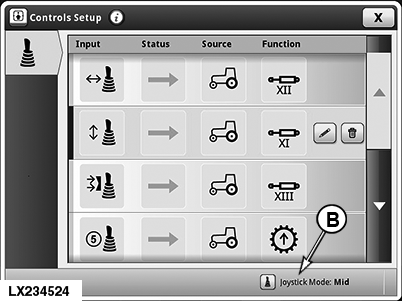
“Controls Setup” Page
NOTE: When the multi-function lever is enabled, all the SCVs assigned to the multi-function lever are locked out (i.e. cannot be operated) from the SCV control levers. These SCVs can only be actuated with the SCV control levers once the multi-function lever has been deactivated.
NOTE: How the tractor is equipped determines which operating modes of the multi-function lever appear on the display.
-
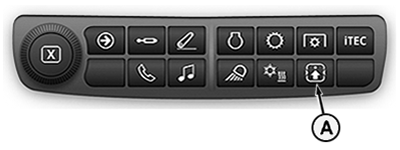
Press button (A).
NOTE: The “Controls Setup” page appears on the display showing how the buttons, functions and movement axes are currently assigned.
-
Press button (B).
NOTE: The “Joystick Mode” page appears.
-
To select, activate or deactivate the operating mode, see the following pages.
NOTE: Assign SCVs and functions to the the movement axes of the multi-function lever. See “Multi-Function Lever — Controls Setup” on the following pages.
Multi-function lever in Tractor mode (example 1)
LX266802-UN-29APR16
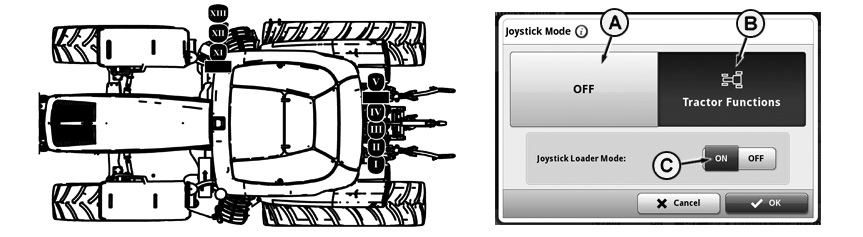
Tractor Equipped With: Front Loader SCVs (XI to XIII) and Rear SCVs (I to V)
IMPORTANT: Always activate the loader mode (C) before working with the front loader. If this is not done, unwanted functions may be triggered accidentally.
When the loader mode is “ON”, all set flow times of the SCVs that are assigned to the multi-function lever are set to “0”.
When the loader mode is “OFF”, the current flow times of the SCVs are maintained.
The tractor mode (B) is displayed when the tractor is equipped with the following SCVs:
• Front loader SCVs (XI to XIII)
• Rear SCVs (I to V)
In tractor mode (example 1), the front loader SCVs and rear SCVs can be operated with the multi-function lever.
To activate the tractor mode, press button (B).
To deactivate the tractor mode, press button (A) “OFF”. All SCVs assigned to the multi-function lever can now again be operated by means of the respective SCV control lever.
Confirm selection with “OK”.
NOTE: The settings are retained.
Multi-function lever in Tractor mode (example 2)
LX266803-UN-29APR16
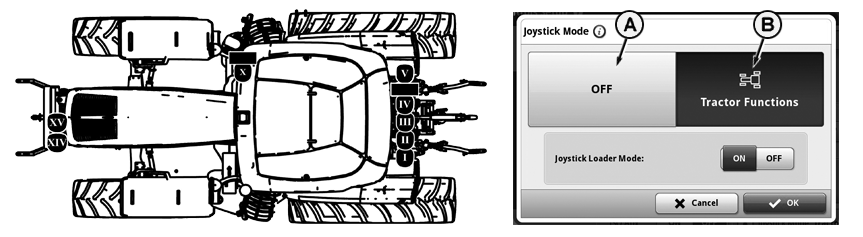
Tractor Equipped With: Front Hitch (Premium) SCVs (X, XIV and XV) and Rear SCVs (I to V)
The tractor mode (B) is displayed when a tractor is equipped with the following SCVs:
• Front hitch (Premium) SCVs (X, XIV and XV)
• Rear SCVs (I to V)
NOTE: Selective control valve XV can be used for ancillary functions only.
In tractor mode (example 2), the front hitch SCVs and rear SCVs can be operated with the multi-function lever.
To activate the tractor mode, press button (B).
To deactivate the tractor mode, press button (A) “OFF”. All SCVs assigned to the multi-function lever can now again be operated by means of the respective SCV control lever.
Confirm selection with “OK”.
NOTE: The settings are retained.
Multi-function lever in Mid/Rear mode
LX266804-UN-29APR16
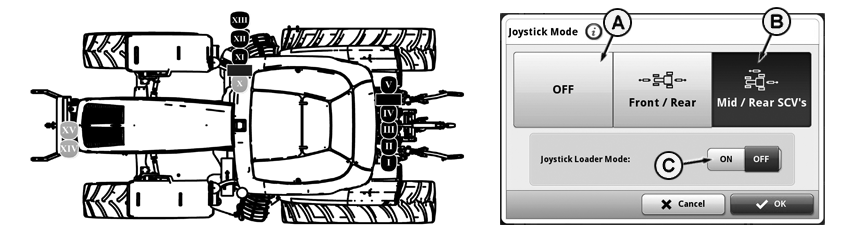
Tractor Equipped With: Front Hitch (Premium) SCVs (X, XIV), Front Loader SCVs (XI to XIII) and Rear SCVs (I to V) / Mid/Rear Mode Active
IMPORTANT: Always activate the loader mode (C) before working with the front loader. If this is not done, unwanted functions may be triggered accidentally.
When the loader mode is “ON”, all set flow times of the SCVs that are assigned to the multi-function lever are set to “0”.
When the loader mode is “OFF”, the current flow times of the SCVs are maintained.
The Front/Rear and Mid/Rear modes are only displayed when the tractor is equipped with the following SCVs:
• Front loader SCVs (XI to XIII)
• Front hitch (Premium) SCVs (X, XIV and XV)
• Rear SCVs (I to V)
In Mid/Rear mode (B), only the front loader SCVs and rear SCVs can be operated with the multi-function lever.
To activate the Mid/Rear mode, press button (B).
To deactivate the Mid/Rear mode, press button (A) “OFF”. All SCVs assigned to the multi-function lever can now again be operated by means of the respective SCV control lever.
Confirm selection with “OK”.
NOTE: The settings are retained.
Multi-function lever in Front/Rear mode
LX266805-UN-29APR16
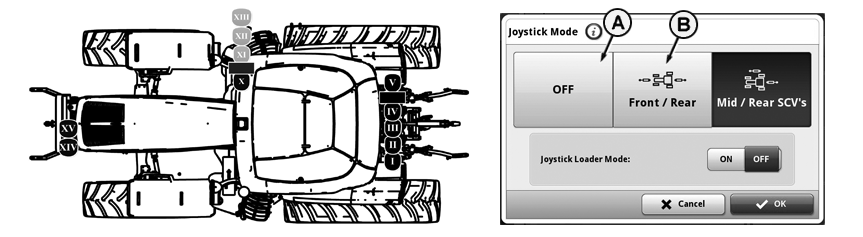
Tractor Equipped With: Front Hitch (Premium) SCVs (X, XIV), Front Loader SCVs (XI to XIII) and Rear SCVs (I to V) / Front/Rear Mode Active
The Front/Rear and Mid/Rear modes are only displayed when the tractor is equipped with the following SCVs:
• Front loader SCVs (XI to XIII)
• Front hitch (Premium) SCVs (X, XIV and XV)
• Rear SCVs (I to V)
In Front/Rear mode (B), only the front hitch SCVs and rear SCVs can be operated with the multi-function lever.
To activate the Front/Rear mode, press button (B).
To deactivate the Front/Rear mode, press button (A) “OFF”. All SCVs assigned to the multi-function lever can now again be operated by means of the respective SCV control lever.
Confirm selection with “OK”.
NOTE: The settings are retained.
|
OULXA64,00035FE-19-20160504 |