Wheel Slip Calibration
RXA0147928-UN-13APR15
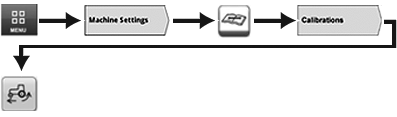
Menu → Machine Settings Tab → Maintenance & Calibrations Icon → Calibrations Tab → Wheel Slip Calibration Icon
RXA0147582-UN-10MAR15
RXA0147583-UN-10MAR15
RXA0147584-UN-10MAR15
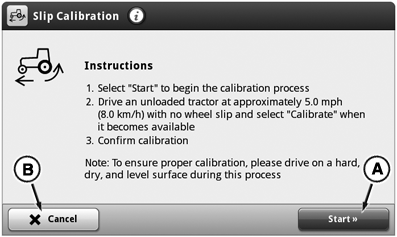
A - Start Key
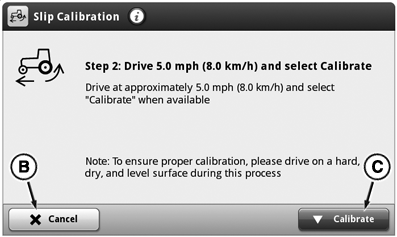
B - Cancel Button
C - Calibrate Button
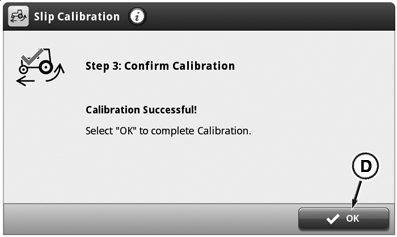
D - OK Button
 CAUTION: Avoid personal injury. Perform calibration in safe
and open area that is clear of objects and bystanders.
CAUTION: Avoid personal injury. Perform calibration in safe
and open area that is clear of objects and bystanders.
Perform wheel slip calibration if:
- Radar calibration has been performed.
- Wheel slip is displayed when wheel slip should not be present.
- Tire size was changed.
- Ballast of tractor was changed.
- Select Menu.
- Select Machine Settings tab.
- Select Maintenance & Calibrations icon.
-
Select Calibration tab.
NOTE: Tractor must be in motion for slip calibration icon to
appear.
-
Select Wheel Slip Calibration icon.
NOTE: Slip calibration can be canceled by selecting cancel button
(B).
- Select Start button (A) to begin wheel slip calibration process.
- Drive the non-loaded tractor onto a hard, dry and level surface at least 8 km/h (5 mph).
- Press Calibration switch (C).
- Press OK button (C) to complete wheel slip calibration.
If wheel slip calibration is unsuccessful after three attempts, contact your John Deere™ dealer.
|
OULXA64,0003BD7-19-20160225 |