Shortcut Buttons
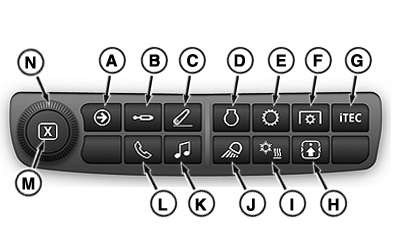
Generation 4 CommandCenter™ navigation bar shortcut buttons allow operator direct access to specific applications.
RXA0132501-UN-15MAY13
Generation 4 CommandCenter™ Navigation Bar
A - Next Run Page
B - SCV
C - Rear Hitch
D - Engine
E - Transmission
F - PTO
G - iTEC™
H - Setting Up the Controls
I - Heater / Ventilation / Air Conditioning (HVAC)
J - Lights
K - Audio
L - Phone
M - Close Button
N - Adjusting Dial
NOTE: If the CommandCenter™ is unresponsive for more than a few minutes under normal operating conditions, then reset the display. To reset the display, refer to “Turn Display On and Off” in this section of the Operator's Manual.
|
OULXA64,0003D6D-19-20160608 |