Auto Exhaust Filter Cleaning

RXA0127004-UN-20JUL12
Menu Softkey → Tractor Settings Tab → Engine Softkey
LX205069-UN-04SEP13
LX205070-UN-04SEP13
LX205072-UN-04SEP13
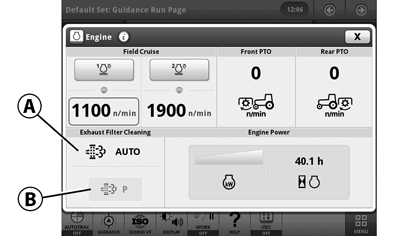
A - Button, Accessing the “Automatic Exhaust Filter Cleaning” Page
B* - Button, Accessing the “Parked Filter Cleaning" Page
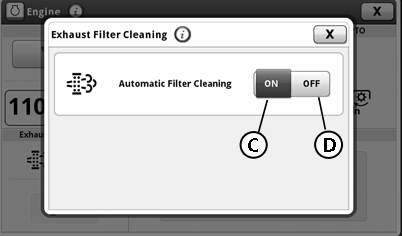
C** - Button, Activating Automatic Exhaust Filter Cleaning
D** - Button, Deactivating Automatic Exhaust Filter Cleaning
Automatic exhaust filter cleaning can be activated (C) or deactivated (D). To change the setting, proceed as follows:
- Select Menu softkey.
- Select Tractor Settings tab.
- Select Engine softkey.
- Select Automatic exhaust filter cleaning (A).
- Select button (C)** to activate automatic exhaust filter cleaning.
- Select button (D)** to deactivate automatic exhaust filter cleaning.
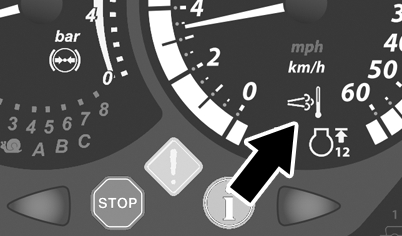
The automatic mode permits the exhaust filter system to be cleaned whenever necessary. The indicator light (see arrow) on the instrument panel and the CommandCenter™prompts provide operator information related to exhaust filter system activity.
The indicator light (see arrow) comes on when exhaust filter system is performing exhaust filter cleaning.
IMPORTANT: Deactivate automatic exhaust filter cleaning (D)** when the tractor is temporarily connected to an indoor ducted exhaust system for diagnostic and repair activities.
IMPORTANT: Recommended practice is to select automatic exhaust filter cleaning. Repeatedly interrupting an exhaust filter cleaning process and ignoring prompts to carry out exhaust filter cleaning will result in a reduction in engine performance and may make it necessary to carry out service-cleaning at your John Deere™ dealer.
Comply with safety instructions; see Clean Exhaust Filter Safely in Section 05.
IMPORTANT: During exhaust filter cleaning operation, there may be higher exhaust gas temperatures and engine may operate at elevated idle.
*Depending on exhaust filter soot level, the display for parked filter cleaning (B) may be active or inactive (grayed out).
**In all languages other than English, “1” is used here for activate and “0” for deactivate.
|
CommandCenter is a trademark of Deere & Company. |
OULXBER,0002242-19-20130910 |