RTP - Access the Return-to-Position Page
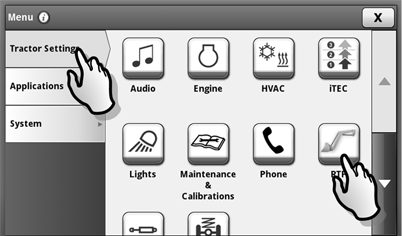
LX211111-UN-14MAY14
LX211114-UN-21MAY14
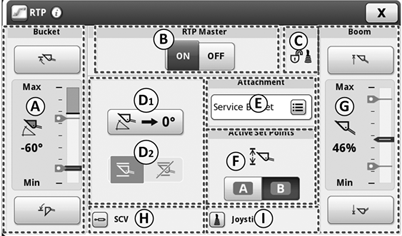
The Various Sections of the Page
A - Status and Setting of Setpoints for Bucket Angle
B - Return-to-Position Toggle Switch
C - Lock Status of Multi-Function Lever
D1 - Set the Zero Point
D2 - Toggle Switch for Electronic Self-Leveling
E - Selection Range for Saved Implements
F - Toggle Switch for Selecting the Setpoint Ranges (A or B)
G - Status and Setting of Setpoints for Boom Position
H - Change to SCV Main Page
I - Change to Multi-function Lever Setup
|
OULXBER,00023C5-19-20141201 |