RTP - Return-to-Position Page, Functions
LX211112-UN-12MAY14
|
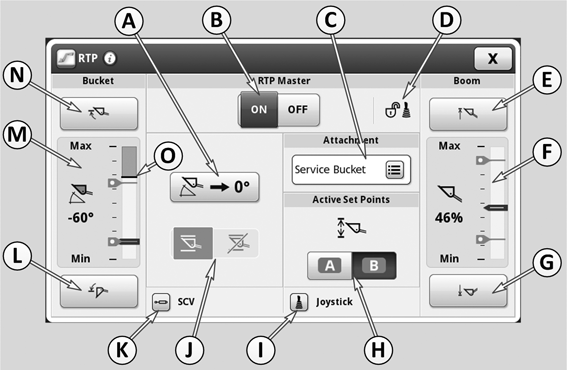
A |
Softkey for saving the current bucket position as 0°-position (neutral position allowing a frequently used position to be found easily). |
|
B |
Softkeys for switching Return-to-Position function on and off (ON when the left softkey is grayed out). |
|
C |
Display and drop-down box for selecting an implement. Various implements (and applications) can be saved here. The following settings can be saved for each implement: The setpoints in both ranges; flow settings of SCVs 11 and 12, the characteristics of the multi-function lever and the 0°-position of the bucket. |
|
D |
Display - Lock status of multi-function lever (locked or unlocked) |
|
E |
Define the top setpoint to which the boom should return automatically. Move the boom to the desired height and press softkey (E) to define this position as the top setpoint. |
|
F |
Display showing the movement range of the boom and the current position (more details can be found below). |
|
G |
Define the bottom setpoint to which the boom should return automatically. Move the boom to the desired height and press softkey (G) to define this position as the bottom setpoint. |
|
H |
Softkeys for toggling between the two setpoint ranges A and B. Two separate ranges of setpoints can be used for each implement. A range consists of one top and one bottom setpoint each for boom and bucket. On the display, different colors indicate which range is currently selected (A = blue and B = green). Toggling between A and B can also be achieved using button 8 on the multi-function lever. |
|
I |
Softkey for changing to Multi-function Lever Setup (see text on electrical multi-function lever in this section). |
|
J |
Softkeys for switching electronic self-leveling on and off. If return-to-position (B) is switched on, electronic self-leveling can be de-activated only if the front loader has mechanical self-leveling. |
|
K |
Change to SCV settings (see text on Selective Control Valves in this section). |
|
L |
Define the bottom setpoint to which the bucket should return automatically. Move the bucket to the desired angle and press softkey (L) to define this position as the bottom setpoint. |
|
M |
Display showing the angle of the bucket and the current position (more details can be found below). |
|
N |
Define the top setpoint to which the bucket should return automatically. Move the bucket to the desired angle and press softkey (N) to define this position as the top setpoint. |
|
O |
This line indicates the highest point that can be reached when electronic self-leveling is active. |
NOTE: If a front loader without mechanical self-leveling is installed, electronic self-leveling is activated automatically when the tractor is started. If automatic return-to-position is activated, the softkeys for switching electronic self-leveling on and off are grayed out and cannot be used.
If a front loader with mechanical self-leveling is installed, the previous electronic self-leveling setting (on or off) remains activated when the engine is started.
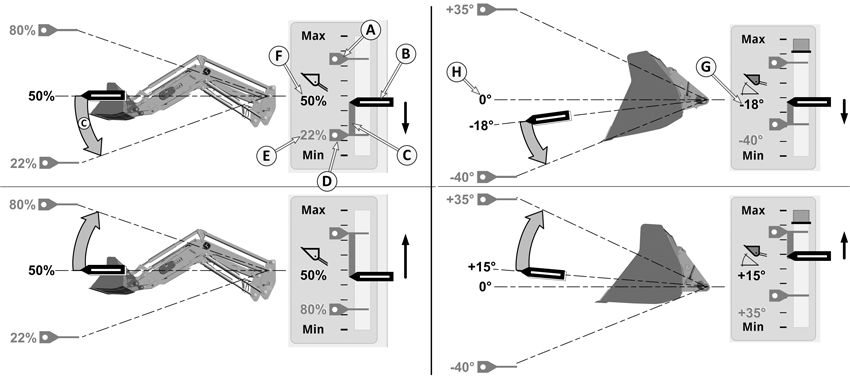
Display during front loader operation
LX211118-UN-05MAY14
A - Top setpoint, variable position to which the front
loader can move automatically.
B - Position indicator showing current position.
C - A colored bar-graph appears when the boom or bucket
is in motion. This represents the distance that has to be travelled.
D - Bottom setpoint, variable position to which the
front loader can move automatically.
E - This percentage corresponds to the setpoint to
which the boom is currently moving.
F - This percentage corresponds to the current boom
position in relation to maximum possible range of travel (all the
way up = 100%).
G - Unlike with the boom, the bucket is represented
on the display by the current angle. The displayed angle is measured
from the stored zero position, see (H). A plus sign means that the
current angle is above the zero position. A negative sign means that
the current angle is below the zero position.
H - Zero position (0°), an adjustable position
allowing a frequently used angle to be found easily. The bucket has
to be controlled manually.
|
OULXBER,00023C9-19-20141201 |