iTEC™ Basic - Operating the Intelligent Total Equipment Control
LX266799-UN-11APR16
LX1056694-UN-10JUL12
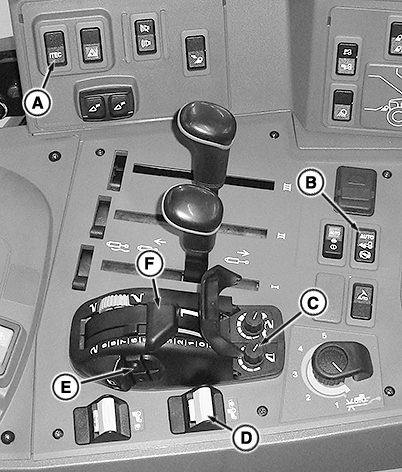
A - iTEC™ Switch
B - Front-Wheel Drive Switch
C - Height-Limit Control
D - Rear PTO Switch
E - Hitch Switch
F - Depth Control
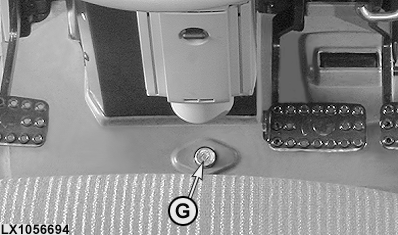
G - Differential Lock1
With iTEC™ Basic, the differential lock1 (G), front-wheel drive (B) (only in the Auto position), and rear PTO (D) can be switched on and off individually or together, automatically by pressing the hitch switch (E).
Switch on the differential lock (G), front-wheel drive (B) (only in the Auto position), and/or rear PTO (D) as required (indicator lights are illuminated continuously). Activate iTEC™ Basic by pressing the iTEC™ switch (A) (an acoustic signal sounds and the continuous illumination of the indicator lights changes to flashing quickly = long on, briefly off).
NOTE: If a function is to be integrated in or removed from iTEC™ Basic later on, switch iTEC™ Basic off and reactivate with all desired functions.
Before turning at the headland, the implement is raised by means of switch (E). The differential lock cuts out immediately, the rear PTO switches off when preset raise height percentage (%) is exceeded, and the front-wheel drive when the implement reaches its transport position. The indicator lights go from flashing quickly to flashing slowly (on briefly, off for longer). If the implement is raised by means of the depth control, iTEC™ Basic will not react.
NOTE: Automatic shut-off of the rear PTO can be selected either at the point when a percentage (%) of raise height is reached, or when transport position is reached. To do this, access diagnostic address “SMB 91” and enter either the desired percentage (%) or enter "0" for shut-off when transport position is reached. See “SMB - Control Software” in the “Diagnostic Trouble Codes and Settings” section.
When subsequently lowering the implement, the differential lock and front-wheel drive immediately re-engage; the rear PTO is not activated unless the implement has reached its operating position (the indicator lights will go from flashing slowly to flashing quickly).
IMPORTANT: When lowering the implement, functions can only be activated at a ground speed of at least 0.5 km/h (0.31 mph).
NOTE: Automatic switch-on of the rear PTO can also be selected at the point when the implement drops below a preset percentage (%) of raise height. To do this, access diagnostic address “SMB 90” and enter either the desired percentage (%) or enter "0" for switch-on when working position is reached. See “SMB - Control Software” in the “Diagnostic Trouble Codes and Settings” section.
If iTEC™ Basic is turned off by means of iTEC™ switch (A), all automatic functions will be canceled (an acoustic alarm sounds and the indicator lights go from flashing quickly to continuous illumination or they go out completely).
NOTE: Front-wheel drive (B) can be set for continuous operation at any time, regardless of iTEC™ Basic (e.g. for turning at the end of steep, wet fields). If the front-wheel drive switch is reset to the Auto position, the front-wheel drive function is integrated in iTEC™ Basic again.
|
1 If equipped
|
OULXA64,00035F8-19-20161216 |