Multi-Function Lever, Electrical — Controls
LX234590-UN-27FEB15
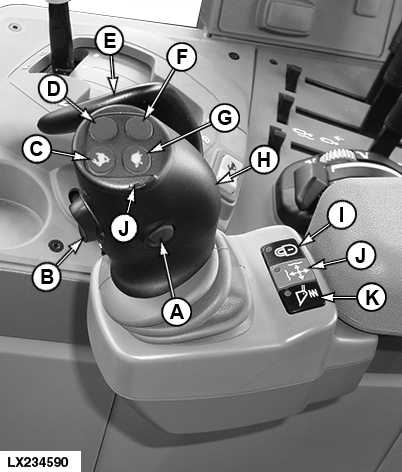
A - Button for Diverter Valve 11
B - Raise/Lower Rocker Switch
C - Gear-Shift Button, Changing Up
D - Button for Diverter Valve 22
E - Hand Flap for Activating the Multi-Function Lever
F - Memo Button2
G - Gear-Shift Button, Changing Down
H - Multi-Function Lever
I - Lock Button, Multi-Function Lever ON/OFF
J - Indicator Light, Multi-Function Lever Active
K - Button for Activating Front-Loader Dampening1
 CAUTION: To avoid sudden movements and possible accidents, never
operate front loaders in combination with iTEC™.
CAUTION: To avoid sudden movements and possible accidents, never
operate front loaders in combination with iTEC™.
IMPORTANT: The multi-function lever on the right armrest may contact the side console if seat is in full right-hand swivel position. Check seat swivel, seat height and seat adjustment (forward/backward) to avoid contact.
IMPORTANT: Always lock the multi-function lever and the SCVs when driving on public roads (see the following pages).
IMPORTANT: While operating a front loader, make sure that none of the detent positions have programmed time limits. To do this, "Loader Mode" has to be activated in the instrument panel. See "Electronic Selective Control Valves - Adjust Flow Rate and Flow Time" in this section.
Multi-function lever (H) permits operation of selective control valves (SCVs) XI to XIII, which are located behind the right access step.
Multi-function lever (A) permits two SCVs to be operated at the same time. A third control valve is actuated via rocker switch (B), permitting an additional function to be controlled.
If the rocker switch is moved beyond the perceptible kiss pressure (click position) and then released, the hydraulic cylinder of the connected implement is retracted or extended in accordance with the preset flow time and flow rate.
If Memo button (F) is pressed simultaneously during the lifting or lowering, the hydraulic cylinder of the front loader bucket moves only to the preset position (only with John Deere™ front loaders).
Pressing buttons (A) and (D) actuates the diverter valves of the implement, permitting additional functions to be controlled.
NOTE: For more information, see implement operator's manual.
Front-loader dampening is switched on and off at button (K). When front-loader dampening is switched on, the LED in button (K) lights up.
NOTE: Front-loader dampening remains switched off every time the engine is started.
Gear-shift buttons (C) and (G) allow the gears at the transmission to be shifted.
CAUTION: When the front loader is not in use, the multi-function
lever has to be blocked. To do so, press button (I) and make sure
that the indicator light of button (I) is lit. If this is not done,
the front loader may be inadvertently actuated while the tractor is
in motion, which could lead to serious accidents.
Press button (I) to unlock the multi-function lever. Indicator lights (J) are green if the multi-function lever is ready for use.
For further information on layout, functions, and lock functions of the multi-function lever, see the following pages.
|
1 European edition only
|
OULXA64,000362A-19-20151116 |