Selective Control Valves, Electronic - Adjusting SCV Flow Rate and Flow Time
LX1056690-UN-04JUL12
LX1057511-UN-08JUN15
LX1057512-UN-08JUN15
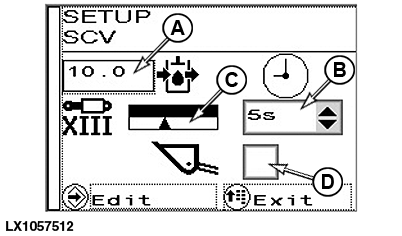
IMPORTANT: Always activate the loader mode (D) before working with the front loader. If this is not done, unwanted functions may be triggered accidentally.
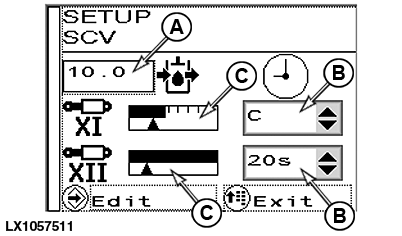
SCVs XI to XIII have flow rate and flow time settings to adjust both extend and retract settings. These SCVs are operated electro-hydraulically by means of the electrically controlled multi-function lever only.
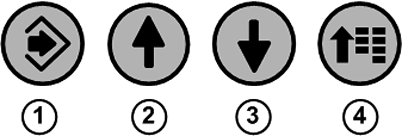
To set the flow rate and the flow time, press menu button (4) repeatedly until the page for selective control valves appears.
Press arrow button (3) and then press confirm button (1).
Use arrow buttons (2) or (3) to select the desired input box (A) or (B).
Press confirm button (1) and set the desired flow rate (A) or flow time (B) using the arrow buttons.
Save selection using the confirm button.
To exit press menu button (4).
NOTE: Moving the multi-function lever to its click position activates the selected function in relation to the preset flow rate and flow time.
NOTE: The flow rate is represented graphically in display boxes (C).
Activate or deactivate loader mode
When the loader mode is activated, all set flow times of the SCVs XI to XIII are set to “0”.
When the loader mode is deactivated, all current flow times of the SCVs XI to XIII are maintained.
To activate or deactivate the loader mode, navigate to check box (D) of the loader mode with the arrow buttons (2) or (3).
Press confirm button (1) and activate or deactivate the check box (D) with the arrow keys.
Save selection using the confirm button.
|
OULXA64,0003631-19-20150609 |