STOP, Service Alert, and Information Indicators
NOTE:
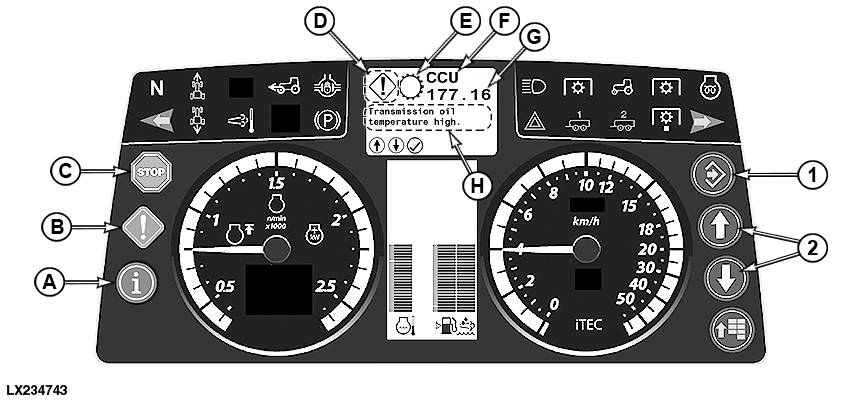
LX234743-UN-02JUL15
Diagnostic Trouble Codes
A - Information Indicator
B - Service Alert Indicator
C - STOP Indicator
D - Icon Display (Information, Service, or STOP)
E - Icon for System
F - Control Software
G - Diagnostic Trouble Code
H - Text Field / Solution
1 - Confirm Button (Confirming, Hiding, Saving, and Starting)
2 - Arrow Buttons (Up and Down)
All STOP, service, and information indicators are accompanied by an informative message, a diagnostic code, and/or an error description on the digital display.The basic information of the diagnostic trouble code is displayed in the text field (H). Additional information can be opened through the scroll keys (2).
Operator information is displayed in the text field (H) without icon display (D).
Indicator (C) for STOP: The light flashes and an uninterrupted alarm signal sounds. A serious malfunction has occurred, requiring immediate attention or the tractor will be damaged. The icons for system (E), control software (F), diagnostic trouble code (G), and solution (H) are displayed in the digital display. If the control software detects a malfunction or a status “out of the permissible range”, a diagnostic trouble code is displayed consisting of the control software and a number. The numbers to the left of the decimal point show the malfunction and the numbers to the right of the decimal point show the status.
IMPORTANT: Engine will shut off automatically if STOP signal is received when operator is out of the seat for longer than 3 seconds and the transmission control is in park position. The digital display can be reset by switching the key switch off and back on again.
If a situation allows one to stop operations immediately, reduce engine speed to idle, then shut off engine and turn ignition on so that the problem and solution can be shown in the digital display. The saved codes might have to be called up; see the section on using diagnostics, saved codes. Correct problem before restarting the engine.
Use the solution displayed on the digital display or visit the authorized dealer if the problem cannot be solved.
When either a service alert or information is displayed, switch the transmission to the park position and shut down the engine.
Indicator (B) for service: The light flashes and the alarm signal sounds five times and indicates a performance problem or malfunction that must be eliminated as soon as possible. Continued operations during a service alert can result in the STOP indicator lighting up. If appropriate corrective action is not taken soon (serviced, repaired, operated in a different manner), a significant reduction in performance and/or machine damage will occur.
Indicator (A) for information: Light comes on continuously and alarm sounds for 2 seconds, indicating a fault condition. Tractor operations can be continued without damage; but, performance of some functions may be impaired.
Operating in a different manner may correct and clear the "out-of-range" condition. When the Service Alert or Information Indicator is displayed, it might - in some cases - be possible to “acknowledge” and delete it with the confirm button (1). If the condition persists, the diagnostic trouble code may reappear later.
|
OULXA64,000381C-19-20160115 |