Hitch - Using Draft Control
RXA0107203-UN-07APR10
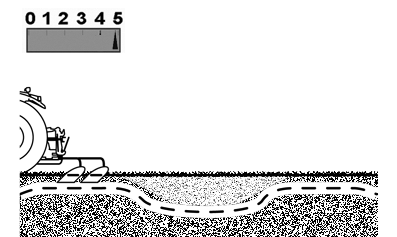
High Response Causes More Depth Variation If Soil Varies
RXA0107204-UN-07APR10
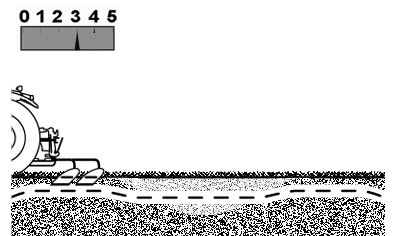
Lower Response Controls Depth Better If Soil Varies
RXA0107205-UN-07APR10
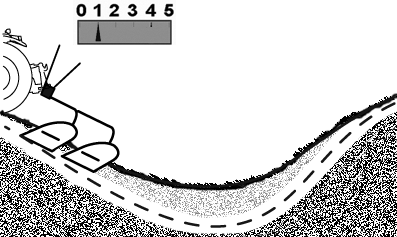
Lower Response Causes More Depth Variation In Rolling Terrain
RXA0107206-UN-07APR10
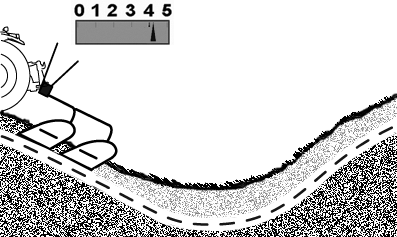
Higher Response Controls Depth Better In Rolling Terrain
Use the draft control to maintain the operating depth when using tillage equipment without float function in rolling terrain, as well as when the responsiveness/tilt of the tractor and sinking rear wheels cause the implement to penetrate the soil too far. If soil density/resistance varies, higher response setting will cause more depth variation. Best setting depends on implement type and field conditions.
Higher values result in a higher responsiveness (faster). Lower values provide less/slower draft response.
Typical draft response/depth settings, by implement type, are:
|
Integral Field Cultivator |
4—5 |
|
Integral Moldboard Plow |
3—5 |
|
Semi-Integral Moldboard Plow |
2—4 |
|
Integral Chisel Plow |
2—4 |
|
Integral Ripper/Subsoiler |
1—3 |
Adjusting the draft response/depth control changes draft responsiveness only. Use hitch control lever to control/change operating depth.
NOTE: Low draft response settings may slow drop rate of some implements. To increase the speed with which the implement penetrates the soil, press and hold the “Raise” control switch of the hitch to activate the quick raise/lower function.
|
OULXA64,0003AD3-19-20151202 |