CommandQuad™ PLUS — Set Engine Droop (Custom Setting)
LX266674-UN-17DEC15
Set Engine Droop
LX266675-UN-15DEC15
LX1056690-UN-04JUL12
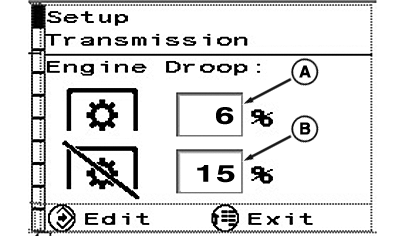
A - Engine Droop with PTO ON
B - Engine Droop with PTO OFF
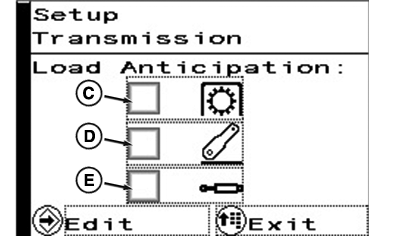
C - Load Anticipation wit PTO in Operation
D - Load Anticipation for Rear Hitch Operation
E - Load Anticipation for Operation of SCVs (Electrically Actuated)
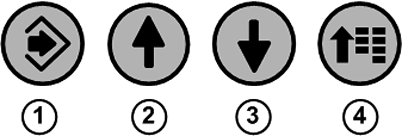
1 - Confirm Button
2 - Up Arrow Button
3 - Down Arrow Button
4 - Menu Button
If engine speed is reduced under load, an adjustable automatic control ensures that e.g. a lower gear is selected to keep engine speed at a constant level when operating a rear PTO. Engine Speed Droop intensity depends on the setting which corresponds to a percentage of the current speed.
Example: If Engine Speed Droop is set to 10 % at a preset engine speed of approx. 1930 rpm, transmission will shift down one gear if speed drops to approx. 1740 rpm. This would correspond to a drop in PTO speed from 540 to about 490 rpm accordingly.
Engine Speed Droop also influences automatic upshifting in user-defined mode. The higher the value set for engine speed droop, the sooner the tractor will shift up.
NOTE: With rear PTO switched on or off, engine speed droop percentage can be set as follows:
— Rear PTO ON, from 6% to 40%,
— Rear PTO OFF, from 20% to 40%
To set engine droop, press menu button (4) repeatedly until the page shown appears.
NOTE: User defined settings have no effect on the automatic mode.
In automatic mode, engine droop is controlled automatically.
With the arrow buttons (2) or (3), select the desired input area and press the confirm button (1).
Use the arrow buttons to gradually set the desired percentage.
Save selection using the confirm button.
To exit, press menu button (4).
Adjust Engine Speed for the Additional Load Anticipation (Custom Setting)
NOTE: User defined settings have no effect on the automatic mode.
In Auto mode, anticipated load is always active.
This setting is used to select an additional anticipated load created for the following operations:
(C) — PTO operation (front and/or rear PTO)
(D) — Rear hitch operation
(E) — Operation of SCVs (electrically actuated)
If the engine speed is reduced due to the load and the front and/or rear PTO is switched on, the engine speed is increased again permanently.
When the hitch or the electrically actuated selective control valves (SCVs) is activated, the engine speed is increased briefly.
To activate or deactivate the relevant function, press menu button (4) repeatedly until the page shown appears.
With arrow buttons (2) or (3), select the check box (A) of the desired function and press the confirm button (1).
Save selection using the confirm button.
To exit, press menu button (4).
|
OULXA64,0003B08-19-20160411 |