CommandQuad™ PLUS — Special Features when Maneuvering the Tractor
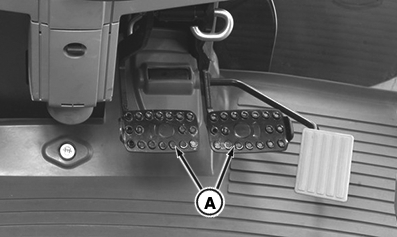
LX266784-UN-01FEB16
Foot Brake with Steering Brake Shown
A - Brake Pedals
 CAUTION: This description applies only if AutoClutch (the automatic
clutch function) is switched on.
CAUTION: This description applies only if AutoClutch (the automatic
clutch function) is switched on.
NOTE: The foot brake may or may not have a steering brake.
- With Steering Brake — Two Brake Pedals
- Without Steering Brake — One Brake Pedal
The automatic clutch function is activated by depressing the foot brake. If the foot brake has a steering brake, both brake pedals must be depressed at the same time. Partially depressing the foot brake allows the tractor to creep - this makes it easier to back up to an implement for example. Fully depressing the foot brake stops the tractor. There is no need to depress the clutch pedal. However, be aware that:
- Full torque remains available even at very slow speeds. In certain conditions, even obstacles will not bring the tractor to a standstill.
- After the brakes are released, the tractor automatically accelerates up to the speed currently commanded by the hand throttle or accelerator pedal.
- If you go back to a tractor with a conventional transmission (without AutoClutch function), and when AutoClutch is switched off, it is essential to remember the following: If the foot brake1 is depressed to stop the tractor, the clutch does not separate automatically and the tractor continues to move in the selected direction of travel.
NOTE: When turning on a downhill slope, depress the foot brake1 to make the tractor change direction faster.
|
1 On foot brake with steering brake, depress the
two brake pedals.
|
OULXA64,0003BAE-19-20170110 |