Digital Display - Information Menu
LX1057736-UN-02JUL12
|
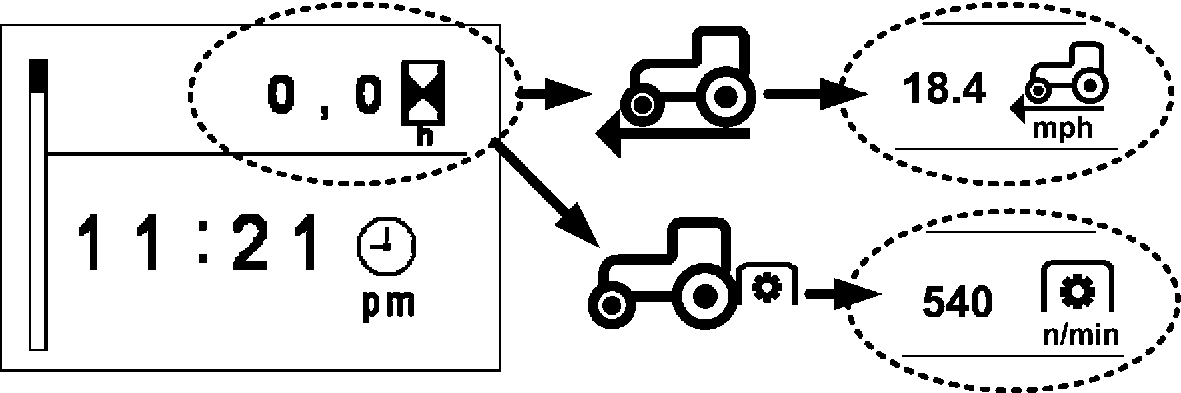
After the ignition is turned on, the operating hours are displayed in the upper part of the digital display. The display changes automatically as listed below. |
|
|
Ignition on .............. |
Display of operating hours and time |
|
Tractor moves.............. |
Display of travel speed |
|
Rear PTO On.............. |
Display of PTO speed |
LX1057735-UN-12JUL12
|
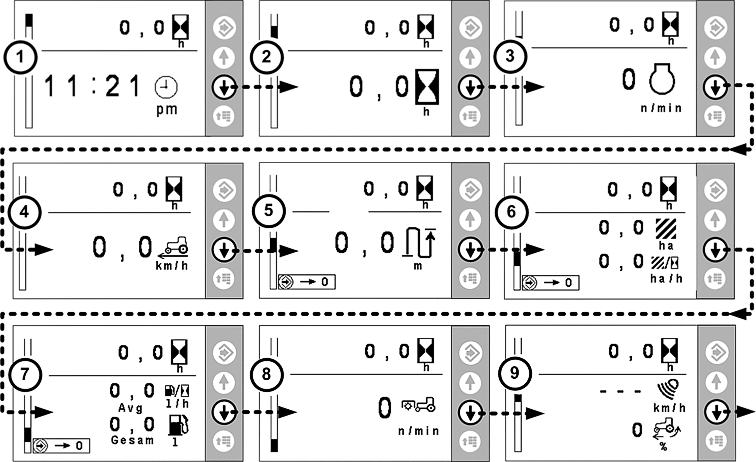
The illustration shows the pages of the information menu. Use the arrow buttons to alternate between the different pages. Press the menu button to go to the next menu. |
||
|
1. Time Display |
4. Travel Speed |
7. Fuel Usage per Hour and Since Last Reset |
|
2. Operating Hours |
5. Distance Traveled |
8. Front PTO Speed |
|
3. Engine Speed |
6. Total Area Worked and Area Worked per Hour |
9. Travel Speed (Measured by Radar) and Wheel Slip in Percent |
|
Note: On pages 5, 6 and 7, the values are reset by means of a long press of the confirm button. Page 9 is only displayed if the tractor is equipped with radar. |
||
|
OULXBER,0001C7A-19-20151126 |