CommandQuad™ PLUS — SoftShift when Changing Gears
LX266677-UN-16DEC15
LX1056690-UN-04JUL12
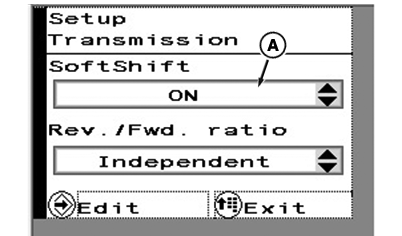
A - SoftShift
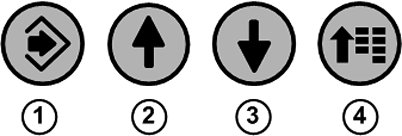
1 - Confirm Button
2 - Up Arrow Button
3 - Down Arrow Button
4 - Menu Button
If this option is enabled, engine speed is altered temporarily by the electronics to achieve a smoother shift.Engine speed can then be matched in the following ways:
AUTO — On, but off if front or rear PTO is in operation
ON — Always on
OFF — Always off
To set engine speed matching, press menu button (4) repeatedly until the page shown appears.
With arrow buttons (2) or (3), select the desired check box (A) and press the confirm button (1).
Use the arrow buttons to select the desired setting.
Save selection using the confirm button.
To exit press menu button (4).
|
OULXA64,0003B0D-19-20151221 |