CommandQuad™ PLUS – Set Maximum Travel Speed

LX266785-UN-01FEB16
LX266668-UN-15DEC15
A - Speed Wheel
B - Range Selection Buttons
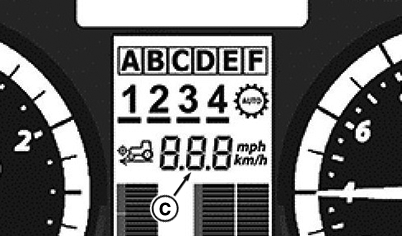
C - Set Maximum Travel Speed
Maximum travel speed is regulated using speed wheel (A).
NOTE: The maximum speed setting (C) is shown on the instrument panel.
The maximum ground speed only has an effect in auto mode.
In manual mode, the tractor can be driven faster than maximum speed setting.
Use buttons (B) to select the desired range and set the desired maximum speed setting using speed wheel (A).
NOTE: In range BE1 or BF2, the maximum speed possible in reverse is 30 km/h (18.64 mph).
NOTE: When the PTO is switched on, priority is given to PTO speed. To increase or reduce travel speed, the tractor's transmission shifts automatically.
|
1 Only with
20/20 transmissions
|
OULXA64,0003BAF-19-20180816 |