CommandQuad™ PLUS - Select Start Gear
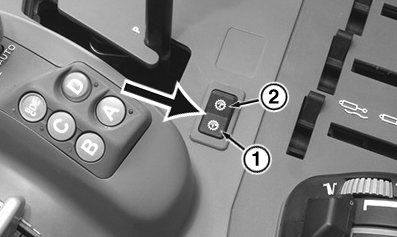
LX364406-UN-24JUN19
1 - Select Start Gear "1"
2 - Select Start Gear "2"
The start gear determines how far the transmission automatically shifts down the gears when the tractor stops.
When a start gear has been activated, the transmission automatically shifts to the selected gear after a stop.
NOTE: When stopping, the transmission only shifts to the start gear if the gear currently engaged is higher than the selected start gear.
These settings are saved and automatically re-activated when the tractor starts again.
- For the ranges A to C, one common start gear can be set.
- Two start gears can be set for the BE ranges.
Valid for 20/20 transmissions:
- For the ranges A to D, one common start gear can be set.
- Two start gears can be set for the BF ranges.
For 24/24 transmissions:
It is possible to toggle between the start gears 1 and 2 by using the switch. While driving, shifting to the displayed start gear can thus occur - this can cause the ground speed to increase.
To set the start gear, see "CommandQuad™ PLUS - Start Gears".
|
OULXA64,0004C81-19-20190624 |