Digital Display - More Settings
Inputs for area calculation:
LX1056933-UN-19SEP14
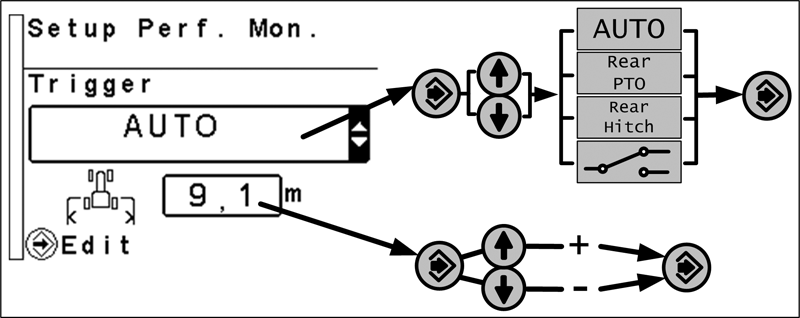
Press the menu button until the page shown is displayed.
The first input area is used to select which function is used for area calculation. Possible options are: AUTOMATIC, REAR PTO, REAR HITCH and IMPLEMENT SWITCH.
In the second input area the working width of the implement is determined.
In AUTOMATIC mode, the area calculation function is activated as soon as the rear PTO and/or the rear hitch is engaged.
NOTE: If the area calculation function is to be turned on via the rear hitch, it is not activated until the rear hitch has reached a certain operating depth (operating depth is determined automatically by the system).
In REAR PTO, REAR HITCH or IMPLEMENT SWITCH mode, the area calculation function is activated as soon as the selected component is engaged.
Service intervals
LX1056931-UN-17SEP14
LX1056932-UN-18SEP14
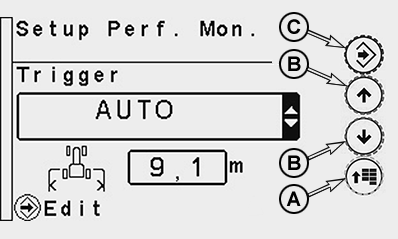
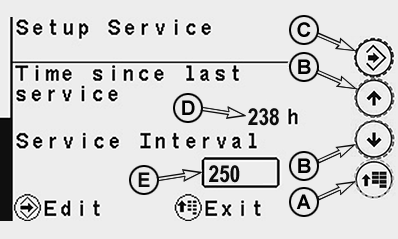
A - Menu Button
B - Arrow Buttons
C - Confirm Button
D - Display Field for Time Since Last Service
E - Display Field for Service Interval
Service intervals are reminders of when regular maintenance needs to be performed on a machine.
Press menu button (A) until the more settings page appears on the display. Access the service interval page by pressing one of the two arrow buttons (B).
If a service interval is not defined at the factory, the next service interval can be entered. To do this, press confirm button (C), use one of the two arrow buttons to navigate to display field (E) and enter the corresponding service interval.
Elapsed time (D) indicates the number of hours since the service interval was reset.
Twenty hours before the service interval is due, the system will inform the operator (acoustic signal) about the upcoming service at every startup until service interval is reset. To do this, press confirm button (C) and use one of the two arrow buttons to navigate to display field (D). Press and hold both arrow buttons simultaneously for approximately 7 seconds until "0" appears on the display.
Press menu button (A) to exit the page. Changes will be saved automatically.
NOTE: The service intervals listed are decisive as described in Section "Lubrication and Periodic Service".
Calibrate John Deere™ dual-beam radar (if equipped)
LX210514-UN-14APR14
Calibrate John Deere™ Dual-Beam Radar
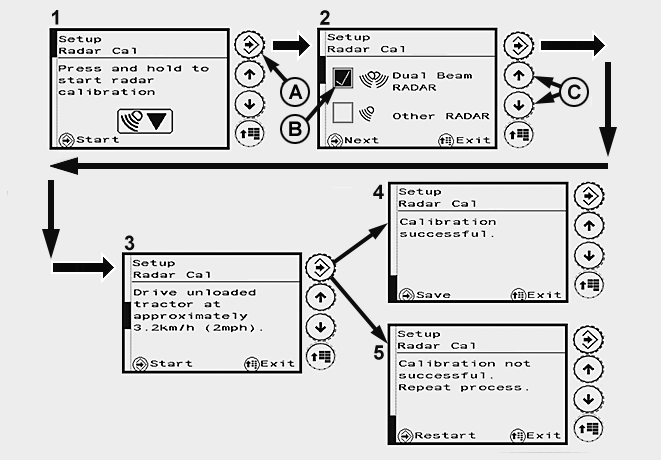
A - Confirm Button
B - Check Box, John Deere™ Dual-Beam Radar Activated
C - Arrow Buttons for Selecting Radar
IMPORTANT: Radars from external suppliers must always be calibrated manually. See Calibrate Other-Make Radars Manually.
The max. current consumption of the radar sensor must not exceed 500 mA. Refer to the operator's manual of the respective implement for more information.
NOTE: Use automatic calibration for John Deere™ dual-beam radar only.
-
Press the menu button until page (1) appears on the display.
Press and hold the confirm button (A) until page (2) appears on the display.
-
On page (2), use arrow buttons (C) to activate the check box (B) for John Deere™ dual-beam radar. Press the confirm button until page (3) appears on the display.
-
Drive the unladen tractor at a speed of approx. 3.2 km/h (2 mph) and press the confirm button.
-
Stop the tractor when either page (4) or page (5) appears on the display.
• If calibration is successful, page (4) appears on the display. Press the confirm button to save.
• If calibration is unsuccessful, page (5) appears on the display. Press the confirm button until page (2) appears on the display and perform calibration again.
NOTE: If calibration fails at three successive attempts, contact your John Deere™ dealer.
NOTE: After the radar has been calibrated successfully, match wheel speed to radar sensor speed. See Match Travel Speed to Radar Sensor Speed.
Calibrate other-make radars manually (if equipped)
LX210512-UN-14APR14
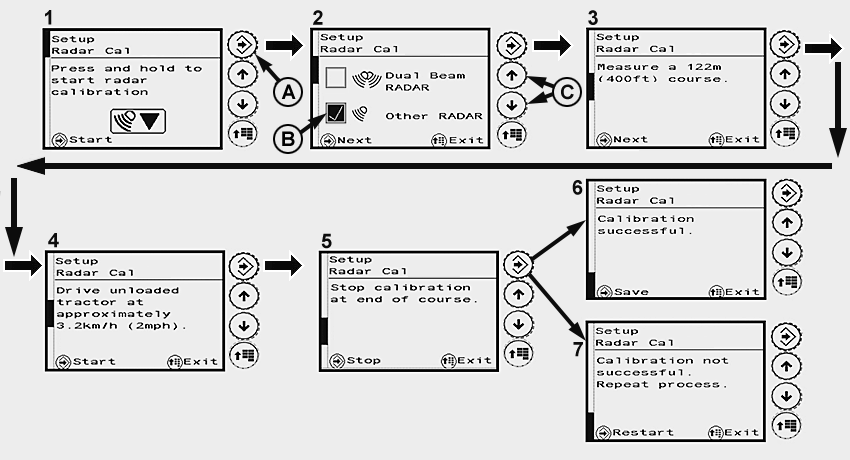
Calibrate Other-Make Radars Manually
A - Confirm Button
B - Check Box, Other-Make Radar Activated
C - Arrow Buttons for Selecting Radar
NOTE: Do not perform manual calibration in John Deere™ dual-beam radar.
Use automatic calibration for John Deere™ dual-beam radar only. See Calibrate John Deere™ Dual-Beam Radar.
Manual calibration of the radar involves calculating the pulses of the radar sensors in relation to travel speed. Comparison between travel speed and radar sensor speed is performed automatically.
Preparation:
Tractor with no load (unladen)
On a hard level dry surface, mark out a 122 m (400 ft.) course. Place easily visible markers at the start and end of the measured course.
Place the tractor at a suitable distance from the starting line of the measured course.
Calibration:
-
Press the menu button until page (1) appears on the display.
Press and hold the confirm button (A) until page (2) appears on the display.
-
On page (2), use arrow buttons (C) to activate the check box (B) for other-make radar. Press the confirm button until page (3) appears on the display.
-
Press the confirm button; page (4) appears on the display. Drive the unladen tractor at a speed of approx. 3.2 km/h (2 mph) and press the confirm button as it crosses the starting line. Page (5) appears on the display.
-
When crossing the finishing line, press the confirm button to complete calibration. Stop the tractor.
-
Either page (6) or page (7) appears on the display.
• If calibration is successful, page (6) appears on the display. Press the confirm button to save.
• If calibration is unsuccessful, page (7) appears on the display. Press the confirm button until page (2) appears on the display and perform calibration again.
NOTE: If calibration fails at three successive attempts, contact your John Deere™ dealer.
NOTE: After the radar has been calibrated successfully, match wheel speed to radar sensor speed. See Match Travel Speed to Radar Sensor Speed.
Match Travel Speed to Radar Sensor Speed
LX210513-UN-06MAY14
Changing the tire circumference can result in deviations with regard to the speed actually travelled. Matching involves recalculating the tire rolling circumference, which is required to calculate travel speed.
Tractors with a radar sensor can make a comparison between displayed travel speed and travel speed that is actually measured.
Preparation:
On a hard, level, dry surface in the open, drive the unladen tractor.
Calibration:
-
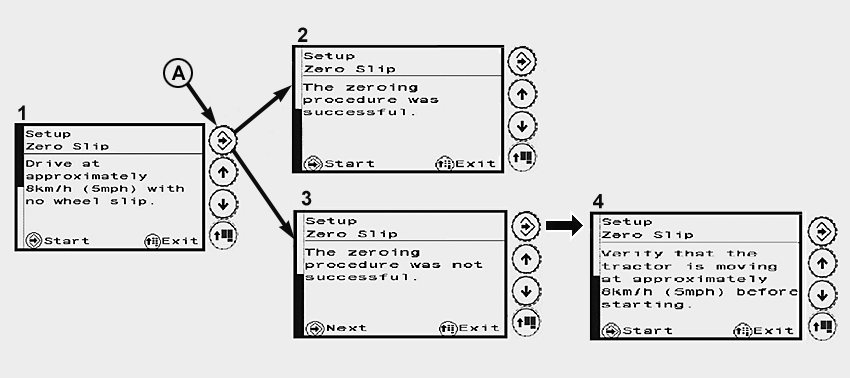
Press the menu button until page (1) appears on the display.
-
Drive the tractor at a speed of approx. 8 km/h (5 mph) and press the confirm button (A).
NOTE: Make sure that the tractor is moving at the required speed of 8 km/h (5 mph).
If the speed is too low, the confirm button does not appear on the display and cannot be pressed.
-
As soon as either page (2) or (3) is displayed, stop the tractor.
• If calibration is successful, page (2) appears on the display. Press the confirm button to save.
• If calibration is unsuccessful, page (3) appears on the display. Press the confirm button until page (4) appears on the display.
Press the confirm button and perform calibration again.
NOTE: If calibration fails at three successive attempts, contact your John Deere™ dealer.
|
OULXBER,0001C89-19-20150908 |