CommandQuad™ PLUS — Set the Start-up Gear
LX266680-UN-16DEC15
LX266681-UN-16DEC15
LX266682-UN-21DEC15
LX1056690-UN-04JUL12
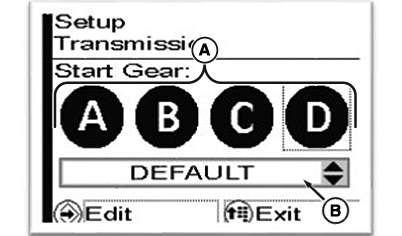
A - Select a Gear
B - Set the Start-Up Gear
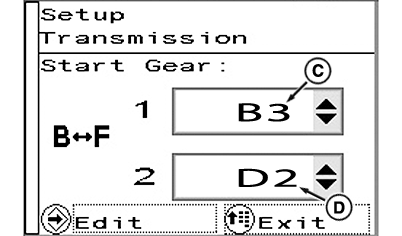
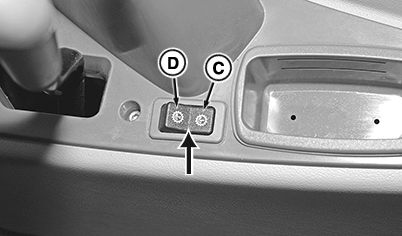
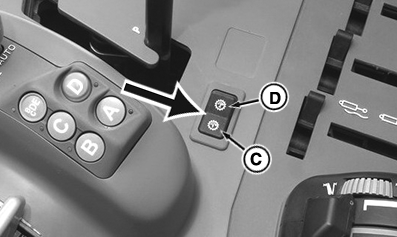
C - Set/Select Start-Up Gear “1”
D - Set/Select Start-Up Gear “2”
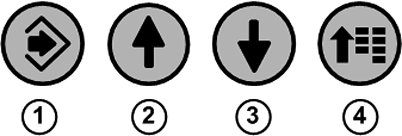
1 - Confirm Button
2 - Up Arrow Button
3 - Down Arrow Button
4 - Menu Button
LX266680-UN-16DEC15
LX266681-UN-16DEC15
LX266787-UN-01FEB16
LX1056690-UN-04JUL12
A - Select a Gear
B - Set the Start-Up Gear
C - Set/Select Start-Up Gear “1”
D - Set/Select Start-Up Gear “2”
1 - Confirm Button
2 - Up Arrow Button
3 - Down Arrow Button
4 - Menu Button
The start-up gear determines how far the transmission automatically shifts down the gears when the tractor stops.
When a start-up gear has been activated, the transmission automatically shifts to the selected start-up gear after a stop.
NOTE: When stopping, the transmission only shifts to the start-up gear if the gear currently engaged is higher than the selected start-up gear.
These settings are saved and automatically re-activated when the tractor starts again.
For ranges A to D:
- For these ranges, one single start-up gear can be set.
For range BF:
- In this range, two start-up gears can be set.
- It is possible to toggle between the start-up gears by using the switch (see arrow). While driving, shifting to the displayed start-up gear can thus occur - this can cause the travel speed to increase.
To set the start-up gear, press menu button (4) repeatedly until the page shown appears.
With arrow buttons (2) or (3), select the check box (A) and press the confirm button (1).
Use the arrow buttons to select the desired setting.
Save selection using the confirm button.
To exit, press menu button (4).
|
OULXA64,0003B0B-19-20160513 |