DirectDrive — Controls
The DirectDrive transmission provides travel speeds in forward travel from 2,6 km/h (1.6 mph) to 40 km/h (25 mph)* or 50 km/h (31 mph)*. In reverse travel, the transmission provides travel speeds from 2,7 km/h (1.68 mph) to 30 km/h (18.6 mph). Maximum speeds may vary slightly due to tire size.
* Depending on version of transmission
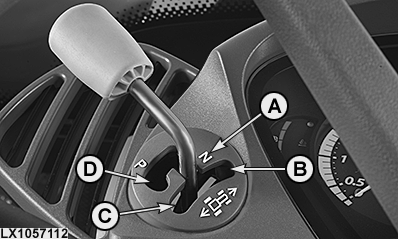
Reverse Drive Lever
LX1057112-UN-23JUL13
LX267055-UN-30MAR17
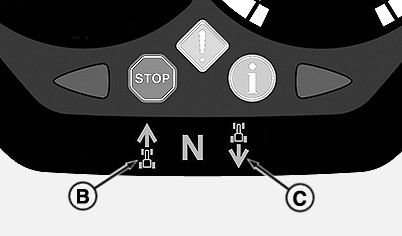
Symbol for Direction of Travel
A — Neutral Position
Disengages
park lock with the engine running allowing tractor to roll, but does
not transmit power to the wheels. N appears on the instrument panel.
B — Forward Travel
In this
position, power is transmitted to the wheels to allow forward travel.
The direction of travel is indicated on the instrument panel as symbol
(B).
C — Reverse Travel
In this
position, power is transmitted to the wheels to allow reverse travel.
The direction of travel is indicated on the instrument panel as symbol
(C).
When the backup alarm is activated, an audible warning signal sounds when the direction of travel is commanded to "reverse". See "Switch the Backup Alarm On or Off (If Equipped)" in Section 50D.
D — Park
In this position,
park lock is applied to hold the tractor stationary and prevent it
from rolling away. P appears on the instrument
panel as soon as the park lock is engaged. Park lock must not be engaged
until the tractor has come to a standstill. This keeps load on the
transmission to a minimum. If the park lock is engaged before the
tractor has come to a standstill, an audible warning is sounded and
the blue INFO light lights up.
NOTE: Engaging the park lock also activates the trailer brake.
To drive the tractor, move the lever to forward (B) or reverse (C). If the lever is moved from forward or reverse back to neutral position (A), the tractor will coast down until it stops.
IMPORTANT: Only the positions shown may be selected. Manually forced intermediate positions may result in malfunctions.
Range shift unit
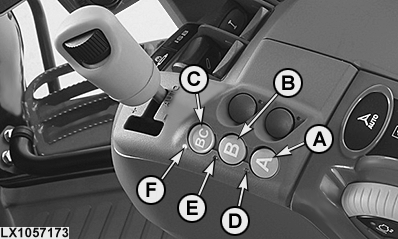
The three ranges of the DirectDrive transmission are shifted electrically. Each range has eight gears.
LX1057173-UN-27AUG13
A - Range A
B - Range B
C - Range BC
D - Indicator Light, Range A
E - Indicator Light, Range B
F - Indicator Light, Range BC
The respective ranges can be selected by pressing buttons (A, B or C). Depending on which range is selected, one of the indicator lights (D, E or F) will glow. The ranges can be changed without operating the clutch.Each range covers a certain speed range and is designed for certain work:
- Range A: 2,6 to 10,8 km/h (1.6 to 6.7 mph) maximum for primary tillage, secondary tillage (with rear PTO), loader and spraying work
- Range B: 5,1 to max. 21,5 km/h (3.2 to 13.4 mph) for seeding, mowing, fertilizing, secondary tillage, and transport work in the field
-
Range BC: Combines the travel speeds
of Range B (5,1 to 21,5 km/h (3.2 to 13.4 mph)) maximum with those
of Range C (13,1 to 42 km/h (8.1 to 26.1 mph)) (with 40 km/h DirectDrive)
15,6 to 53 km/h (9.7 to 32.9 mph) (with 50 km/h DirectDrive transmission)
Range BC is recommended for transport work.
NOTE: Travel speeds may differ slightly, depending on the tire size.
When operating the tractor in range BC, the transmission shifts independently between ranges B and C. In Auto mode, the transmission shifts independently into range C when the highest gear in range B has been reached.
Shift lever
LX1057174-UN-27AUG13
LX267056-UN-30MAR17
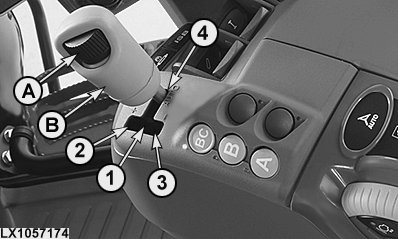
A - Speed Wheel, Maximum Speed
B - Shift Lever
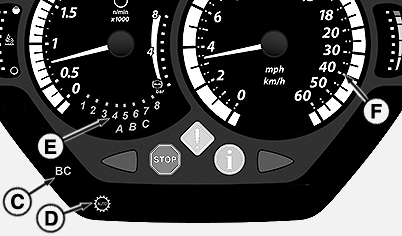
C - Indicator Light, Range BC
D - Indicator Light, Auto Mode
E - Indicator Lights, Ranges and Gears
F - Indicator Lights, Maximum Speed
1 - Manual Mode
2 - Gear Upshift
3 - Gear Downshift
4 - Auto Mode
With shift lever (B), automatic or manual shift mode can be selected.Automatic mode: Move shift lever (B) to position 4 to select Auto mode. Auto mode indicator light (D) lights up on the instrument panel. In Auto mode, engine speed, range (in range BC only), and gear are commanded automatically to achieve set speed and to manage heavy and light loads.
Speed wheel (A) can be used to set maximum speed*. This speed is maintained automatically with engine at full throttle by using accelerator pedal or hand throttle. Speed wheel (A) has no stop and can be infinitely adjusted. It makes a change in relation to the previous setting. If the maximum speed setting is changed with speed wheel (A) while the tractor is moving, the change is always based on the last setting. Any changes are stored in the tractor's electronics. The currently selected maximum speed is indicated by indicator lights (F).
*Separate maximum speeds can be set for ranges A, B and BC.
LX1057176-UN-22JAN14
Multi-Function Lever
LX267047-UN-29MAR17
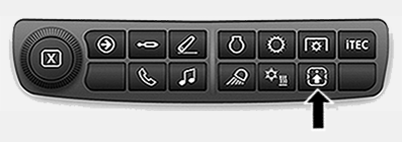
Button for Requesting Current Status of Button Assignment
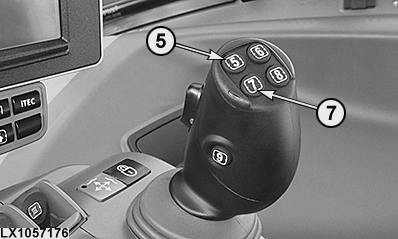
5 - Gearshift Button, Change Up (Default Assignment)
7 - Gearshift Button, Change Down (Default Assignment)
 CAUTION: Risk of injury! Misuse may result in fatal accidents.
Buttons (5) and (7) can be assigned to other tractor functions.
Press button (see arrow) to view current button assignment.
Manual mode: In Manual mode, eight gears can be selected per range. To select this mode, set the shift lever (B) to position 1. For shifting up, push the shift lever (B) forward from position 1 to position 2. For shifting down, push the shift lever backward from position 1 to position 3. After the shifting process has been completed, the shift lever (B) automatically moves back to position 1 again. On tractors with electrical multi-function lever, gears can be shifted up and down using gear-shift buttons (5) and (7).
Indicator lights (E) on the instrument panel show the range and gear selected by the operator. In addition, indicator light (C) shows if range BC (for transport work) is selected. In range BC, the transmission automatically shifts into range C when the highest gear of range B has been reached.
Speed control pedal and hand throttle
LX1057177-UN-14OCT13
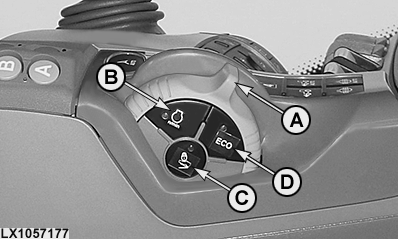
A - Hand Throttle
B - Engine Speed Limit ON/OFF
C - Speed Control Pedal, Save/Delete Speed
D - ECO Mode, Minimum Engine Speed ECO ON or ECO OFF
NOTE: In manual mode, automatic engine speed reduction at low loads is not active.
Speed is controlled via accelerator pedal and hand throttle. The signal used for control is always the signal that commands the higher engine speed.
Engine rpm can be set to a specific speed using the hand throttle.
Button (C) allows the speed control pedal position to be saved. To save position of speed control pedal, proceed as follows:
- Set desired pedal position.
- Press button (C), then release.
- Release the pedal within two seconds. If a pedal position is stored, the indicator light in button (C) lights up.
NOTE: Pedal position cannot be saved if one of the following applies:
- Reverse drive lever in park position
- Reverse drive lever in neutral
- Clutch Pedal Pressed
To delete a saved position, do one of the following:
- Press button (C) again
- Apply brake
- Move the reverse drive lever to park position
- Set the accelerator pedal position to the saved position once again
Once the saved position has been deleted, indicator light in button (C) goes out.
If the speed control pedal or hand throttle is moved to command a higher engine speed, engine speed increases. When load-dependent engine speed reduction is active, once the set ground speed has been reached, engine speed is adjusted automatically as required.
Button (D) allows the operator to toggle between the minimum engine speeds ECO ON and ECO OFF.
NOTE: Button (D) is active in custom mode only.
If the reverse drive lever is in forward or reverse, the tractor can be accelerated up to the set speed using the accelerator pedal or hand throttle. The current ground speed of the vehicle depends directly on the position of the speed control pedal or hand throttle. Engine speed is directly affected by the position of the accelerator pedal only in Manual mode.
Whenever the accelerator or the hand throttle is actuated, the values set in the CommandCenter™ for automatic control and for limiting engine speed are taken into account. For example, the value set for engine-speed limitation is not exceeded, even at full throttle. In AUTO mode, the engine turns only as fast as needed, even at full throttle. As long as the hand throttle and speed control pedal are actuated at full throttle at the same time, the load-dependent limit of the engine speed is not active.
Cruise control can be switched on and off directly using button (B).
NOTE: If hand throttle and accelerator pedal are both used at the same time to reach maximum speed, the transmission does NOT shift to C8. If the hand throttle is actuated fully in addition to a fully pressed accelerator pedal (at maximum speed), the transmission shifts back down from C8 to C7.
Brake pedals
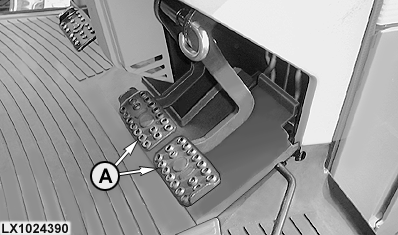
LX1024390-UN-03JUL00
A - Brake Pedals
|
Braking with AutoClutch function switched on |
Braking with AutoClutch function switched off |
|---|---|
|
If both brake pedals are depressed when driving the tractor, the speed will be reduced or the tractor stops. Thanks to the AutoClutch function, there is no need to depress the clutch pedal when braking. When the brakes are released again, the tractor automatically accelerates up to the speed currently commanded by the hand throttle or accelerator pedal. |
Press both brake pedals to reduce speed. To stop, press the clutch pedal at the same time to separate the clutch. See also “Hydraulic Foot Brakes” and “Emergency Brake System”* in Section 50C. *Not for North America |
CAUTION: The AutoClutch function operates only when the brake
pedals are coupled together. Actuating only a single pedal (e.g. as
a steering brake) will NOT activate the AutoClutch function.
NOTE: For driving maneuvers using the steering brake (only one brake pedal is actuated), engine speed must not drop below 900 rpm, otherwise the AutoClutch function becomes active again.
Clutch pedal
When AutoClutch is engaged, there is no need to depress the clutch pedal to stop the tractor. When both brake pedals are pressed, the AutoClutch function becomes active.
When AutoClutch is switched off, the clutch pedal must be pressed to stop the tractor.
|
OULXA64,000400F-19-20200312 |