Shifting the AutoQuad II Transmission
|
|
|
|
|
|
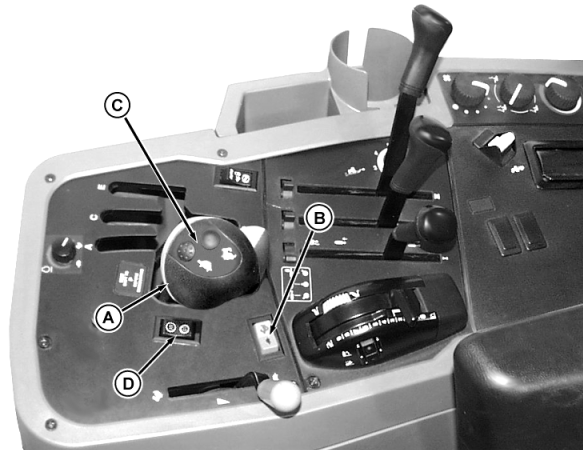
Depress the clutch when shifting from one range to another. Normal operation of AUTO/ECO modes of AutoQuad II transmission occurs when hydraulic oil temperature is above -15° C (5° F). Colder temperatures will affect speed shifting. AUTO/ECO functions will be disabled or limited to slower shifts. Range selection will not be affected. Manual Mode In the manual mode, gear changes are made by pressing the upshift/downshift switch (B) on the console, or switches (C) on range selector lever (A). Rabbit and turtle icons on the switches correspond to upshift and downshift. Gear changes can be made without depressing the clutch. |
AUTO Mode Depressing the AUTO/ECO mode switch (D) activates AUTO mode. Pressing the switch again or pressing the upshift/downshift switch (B) or (C) restores the manual mode. In AUTO mode, engine speed and throttle position are sensed. This allows gear changes within the selected range to be performed automatically. NOTE: AUTO and ECO modes operate only in forward gears. ECO Mode ECO mode functions the same as AUTO mode, except the transmission upshifts sooner, providing quieter operation. |
AG,RF30435,2352 -19-21DEC99-1/2 |
|
Speed Matching Depressing the clutch pedal when changing ranges results in automatic gear selection. The gear selected matches actual vehicle ground speed. |
Skip Shifting Depress shift buttons on top of range shifter quickly and consecutively to skip gears. Shifts therefore can be made from 1 to 4 or from 4 to 1 within a range. |
AG,RF30435,2352 -19-21DEC99-2/2 |