Operating the Radio
|
|
|
|
|
|
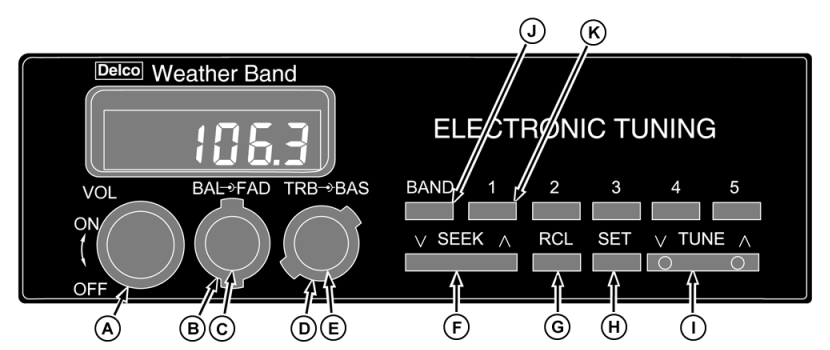
Turn knob (A) to the right to switch on the radio and increase the volume. Turn knob to the left to switch the radio off. Press BAND switch (J) to select AM, FM, or Weather Band (WX). Press TUNE (I) once to tune to the next higher or lower station. Hold switch to rapidly change stations. Press SEEK (F) to search for a receivable station. Five AM/FM stations can be stored for immediate recall by pressing pushbuttons (K). Storing preset stations: |
1.
Tune to desired station.
Press RCL (G) alternately to display time and frequency. Adjust left-right stereo balance by turning knob (B). Adjust front-rear fade by turning fade control (C). Turn treble control (D) to the left to decrease treble and to the right to increase treble. Turn the bass control (E) to the right to increase bass and to the left to decrease bass. |
AG,RF30435,2616 -19-21JAN00-1/1 |