Setting the Clock
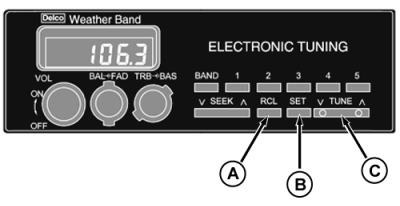
Standard Radio:
1.
If display does not show time of day, press RCL (A).
2.
Press and hold SET (B) and TUNE (C) (
down arrow
) simultaneously until correct hour appears on display.
3.
Press and hold SET and TUNE (
up arrow
) simultaneously until correct minute appears on display.
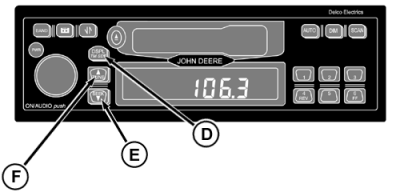
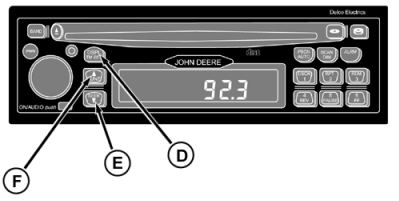
Radio with Cassette or Compact Disc:
1.
Switch ignition to ON position.
2.
Press and hold DSPL/TM SET (D) button until the "hours" digits flash.
3.
Press SEEK (E) or TUNE (F) to set the correct hour.
4.
Press and hold DSPL/TM SET button until the "minutes" digits flash.
5.
Press SEEK or TUNE to set correct minute. The seconds are reset to zero when minute setting is changed.
A-RCL
B-SET
C-TUNE
D-DSPL/TM SET
E-SEEK
F-TUNE
|