Using Hitch Control Lever and Raise/Lower Switch
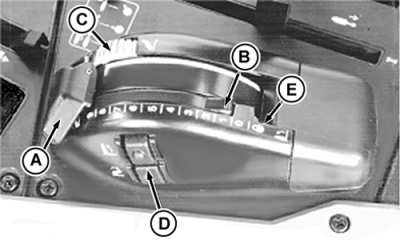
Hitch control lever (A) is used to raise and lower hitch, and to set implement working depth. Pull lever rearward to raise; push lever forward to lower. To set implement working depth, move stop (B) against lever by turning stop wheel (C). Hitch will lower to same working depth each time. If necessary to lower the hitch below the preset depth, the control lever can be lifted and pushed past the stop. Raise/lower switch (D) allows raising and lowering during turns, without having to move the hitch control lever. If the top portion of the raise/lower switch is pressed, the implement is raised as high as the setting of the height-limit control (see Adjusting Height Limit in this section). If the lower portion of the switch is pressed, the implement is lowered as far as the setting at control lever (A).
Raise/lower switches are disabled when the control lever is in the transport lock position (E). Hitch will raise when starting tractor with the hitch control level in the transport lock position. NOTE: Hitch may not lower if quick coupler has been removed. Install 68-91 kg (150-200 lb) or quick coupler of equivalent weight to hitch for normal operation. |
|
 CAUTION:
To prevent possible injury, use ONLY the hitch control lever (A) when attaching or detaching implements. DO NOT use raise/lower switch (D).
CAUTION:
To prevent possible injury, use ONLY the hitch control lever (A) when attaching or detaching implements. DO NOT use raise/lower switch (D).
AG,RX15494,3420 -19-19JAN00-1/1 |