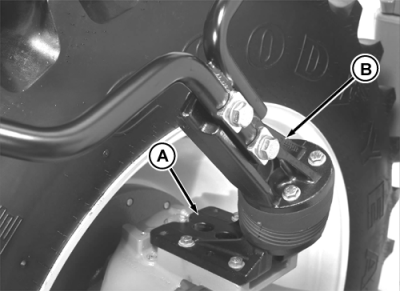
Adjusting Fenders1. Position tires and rims at desired tread setting. 2. Position fender mounting bracket (A) as illustrated for tread settings with rim disk "out". Use second set of holes for tread settings with rim disk "in". NOTE: Mounting bracket must be exchanged with bracket on opposite side of tractor for wide tread settings. Pivot must be turned to incline toward tractor center and bracket must incline toward front of tractor. 3. Position fender support arms (B) as illustrated. Fender support should be centered over the tire center. 4. Center the fender over the tires using holes in support extension arms and tighten cap screws. 5. Check steering stop adjustment. NOTE: Steering stop settings allow 25 mm (1 in.) minimum clearance at maximum turn. Fender deflection against side frame during full turn and oscillation of axle is acceptable. 6. Tighten the fender mounting bracket-to-steering arm cap screws to 125 N·m (92 lb-ft) and support attaching cap screws and nuts to 310 N·m (229 lb-ft). Fender Interference With LoaderIMPORTANT: Tread settings, steering stops, and fender positions need adjustment when installing front end loader to prevent damage. Fender may deflect against loader frame. During normal operation, the frequency of contact between the fender and loader frame should be low and the amount of interference should cause no permanent damage to the loader, tires, or fenders. See loader operator manual for recommendations. |
|
AG,RX15494,2798 -19-27OCT99-1/1 |