Operating the Radio
|
|
|
|
|
|
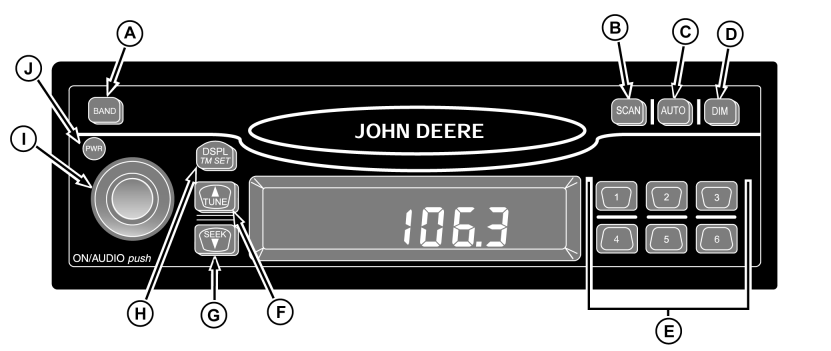
Press BAND (A) to select FM1, FM2, AM, or WX (Weather). Press TUNE (F) once to turn to the next higher station. Press SEEK (G) once to turn to the next lower station. Press and hold both TUNE (F) and BAND (A) to switch between manual tune mode and "seek" mode. Holding SEEK longer than half a second begins the "seek" function. When a station with a strong enough signal is found, "seek" function will stop at that station. Press SCAN (B) to scan all stations. When a strong enough signal is found, the station will play for 5 seconds then continue to scan until SCAN is pressed again. Storing Preset Stations: 1.
Select FM1, FM2, AM, or WX.
|
4. Repeat procedure for remaining preset buttons. Press AUTO (C) until "AUTO" and the "AS" icon appear to automatically store the six strongest stations of a selected band. Press AUTO again to restore original presets. Press DISPL/TM SET (H) to switch between displays. When the receiver is in AM, FM1, FM2, or WX, the display will switch between frequency and time of day. When the receiver is in the cassette mode, the display will switch between TP SIDE1/TP SIDE2 and the time. Adjust volume, bass, treble, fade, and balance by pressing and releasing ON/AUDIO knob (I) repeatedly until desired function appears on display. Rotate ON/AUDIO knob for adjustment. Adjust brightness of display by pressing (D) until "DIM" appears on display. Rotate ON/AUDIO knob to adjust. |
AG,RX15494,3845 -19-28AUG00-1/1 |