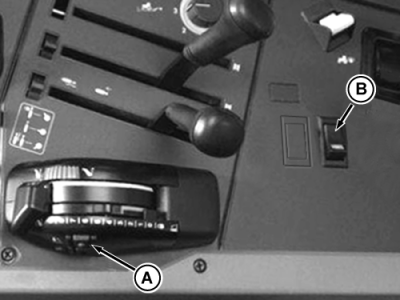
Operating Headland Management System (HMS)When using HMS, the differential lock, MFWD (AUTO position), and rear PTO can be selected singly or together to switch on or off automatically when using raise/lower switch (A). Select differential lock, MFWD and/or rear PTO as necessary. Activate the system by pressing HMS switch (B). A "beep" will sound and the indicator lights will start to flash slowly. Before turning at the end of the field, push hitch raise/lower switch. The differential lock will stop immediately, the rear PTO will stop after hitch has raised 10 percent of lift travel, and MFWD will stop when implement reaches maximum height. The indicator lights will start flashing quickly. When implement is lowered again, the differential lock and MFWD will be activated immediately (indicator lights will change from flashing quickly to flashing slowly). For safety reasons, the rear PTO must be switched on manually. To turn off HMS automatic mode, press HMS switch again. A "beep" will sound and the indicator lights will change from flashing to a continuous glow. NOTE: The maximum use of the HMS is described above. However, it is possible to include only one or two functions in the HMS mode. Functions included in the HMS mode can be switched off at any time (to avoid wasting time starting up rear PTO, it can be left running, while in use). To do this, turn off HMS, turn off any function(s) that are not required, and turn on HMS again. MFWD can be set for continuous operation at any time, regardless of the HMS mode (for example, turning at the end of a steep, wet field). Move MFWD switch from AUTO position to "on" position. |
|
AG,RX15494,1685 -19-26AUG99-1/1 |