CommandCenter Split-Screen-Constant Top-Half Display
|
|
|
|
|
|
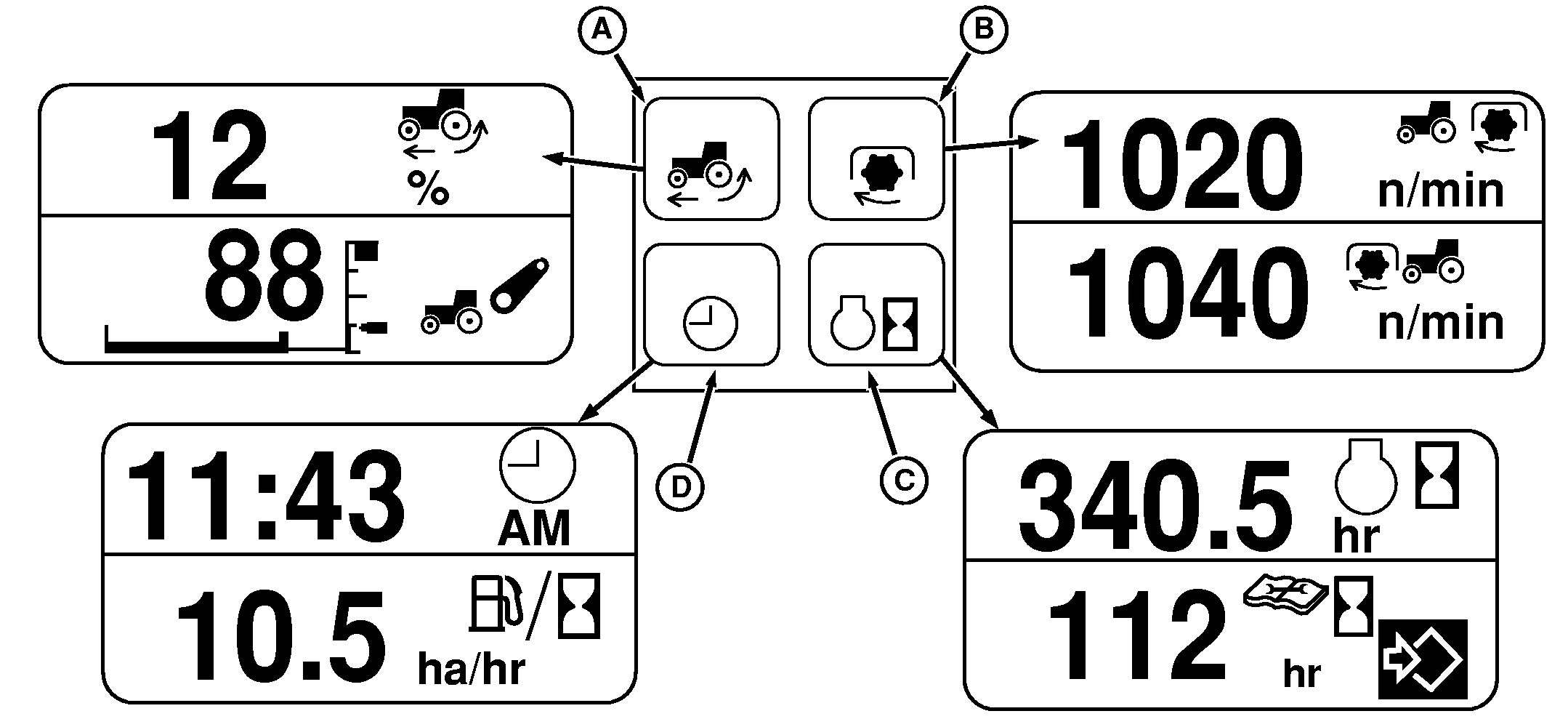
Top half of the split screen is selected for constant display using switches (A-D). The same four screens are also selectable for bottom-half display. A-% SLIP: Displays current wheel slippage as a percent of wheel speed compared to the true ground speed. If true ground speed is not available wheel speed will be displayed. If display reads something other than zero when traveling on hard surface where there should be no wheel slip, push and hold touch pad (A) to zero. B-PTO SPEED: Displays rear PTO rpm. C-ENG HOURS: Displays total accumulated engine hours. D-CLOCK: Displays current time in hours and minutes. Clock can be set to display in 12-hour or |
24-hour format. (See SETTING CLOCK AND SERVICE ALARM INTERVAL in this section.)
SPLIT SCREEN: Different bottom-half displays can be associated with the four constant top-half displays. Four screen associations can be set up; one for each of the four switches. To set up screen associations, press one of the switches to bring up the desired top-half display; then rotate Command Dial until the desired bottom-half display appears. Press another switch to set up a different top/bottom association. By setting up screen associations, the same top- and bottom-half screens will display together whenever the selected switch is pressed. |
OU1092A,0000401 -19-15AUG05-1/1 |