Adjusting Hitch Rate-of-Drop
|
|
|
|
|
|
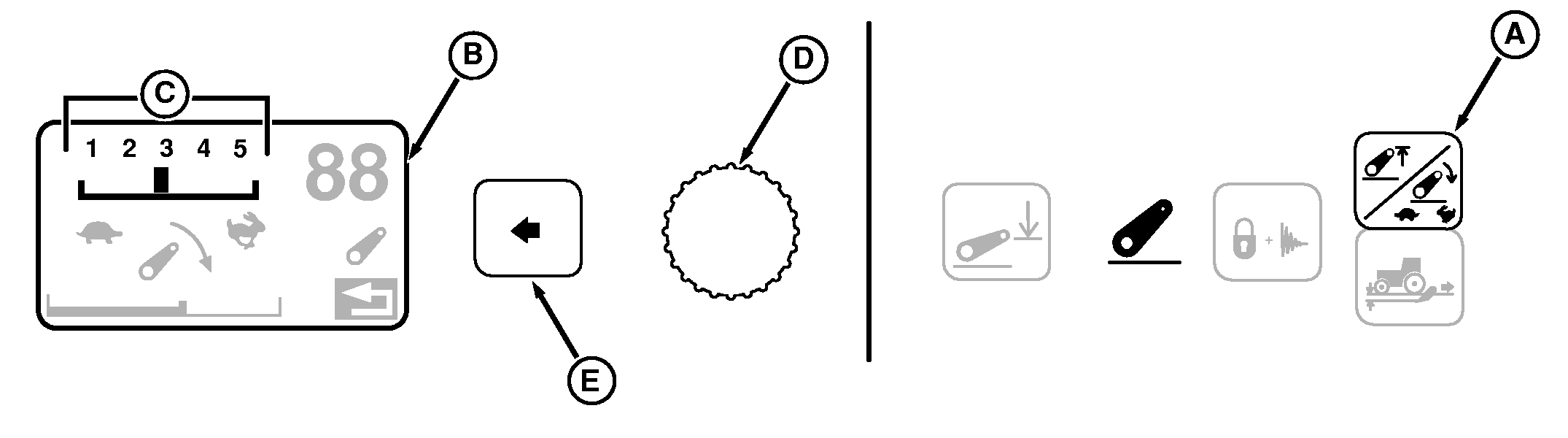
Hitch rate-of-drop is adjusted in the CommandCenter. 1. Press Height/Rate Switch (A) twice and observe Display (B); current rate-of-drop appears as a numbered scale (C) across the top. |
2. Turn Command dial (D) counterclockwise for slower rate setting (turtle); clockwise for faster setting (rabbit). Changes to rate-of-drop setting take place immediately. 3. When desired rate is reached, press Select Switch (E) to return to previous display. |
 CAUTION:
Excessive drop speed may cause injury or machine damage. Fully lowering implement should take at least two seconds.
CAUTION:
Excessive drop speed may cause injury or machine damage. Fully lowering implement should take at least two seconds.
OU1092A,0000406 -19-28JUL05-1/1 |