TouchSet™ Controls and Displays
|
|
|
|
|
|
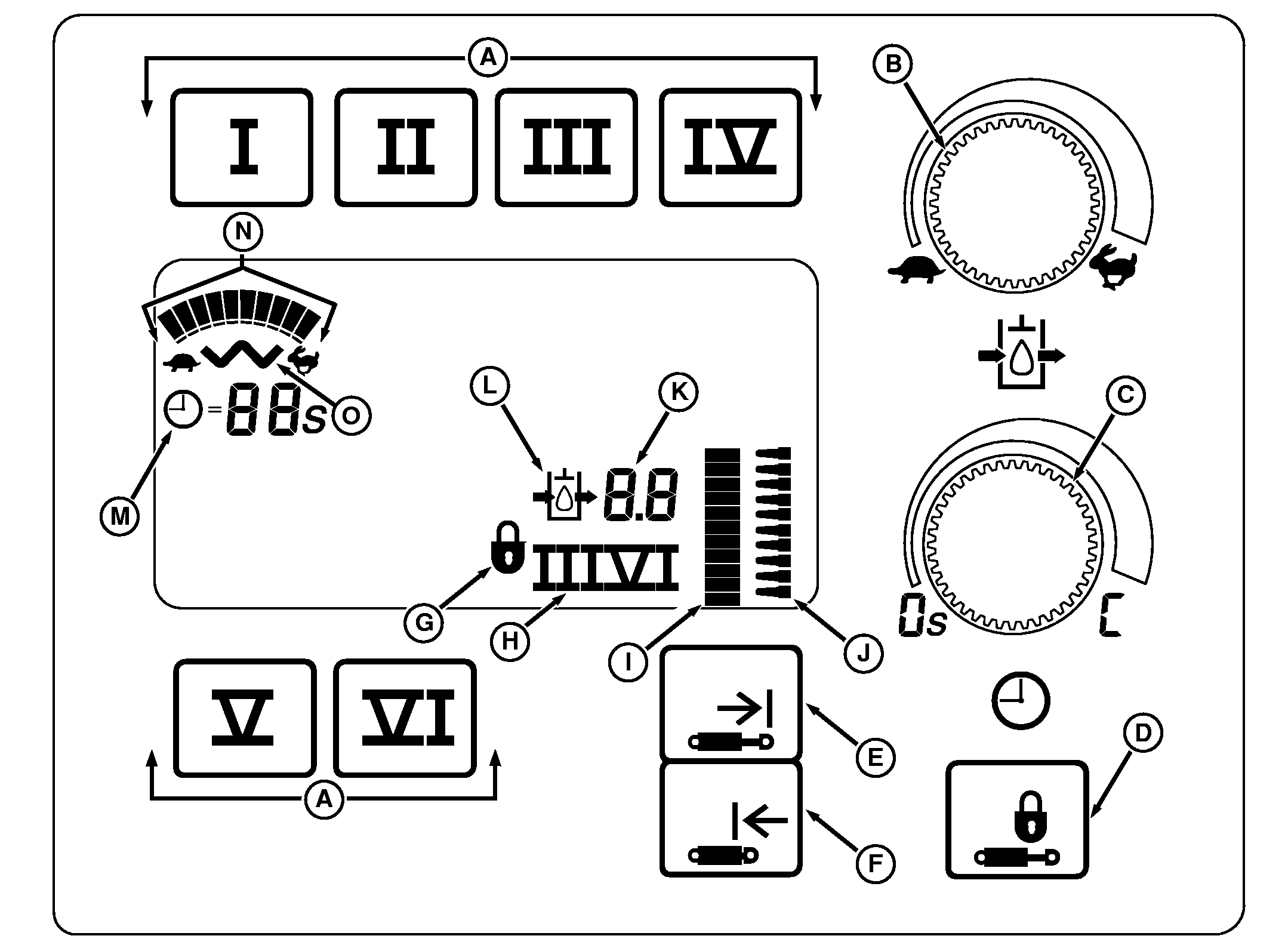
* Will not function without 9-pin implement feedback connector on tractor and position sensor on implement. Hydraulic setup and adjustment panel provides operational display of SCV functions and a means to set flow rate and detent time operation for each SCV. At start up, display will show all SCV numbers and symbols for 2 seconds. After start up, SCV monitor displays selected detent time for each SCV. |
Select SCV number (I-VI). SCV monitor will enter adjustment mode. Bar graph display will show rabbit, turtle and clock symbols for selected SCV. Digital display shows flow setting and detent time for selected SCV. In adjustment mode, selected SCV settings may be changed. Adjustment mode remains activated for 20 seconds after which time display returns to normal operation. |
|
TouchSet is a trademark of Deere & Company | OU1092A,0000409 -19-25JUL05-1/2 |
|
In normal mode, SCV monitor will only display current detent time settings for each SCV. Flow rate will be displayed as a bar graph. |
Transport lock switch (D) disables the SCV levers. This function is used when attaching/detaching implements and before transporting implements. |
OU1092A,0000409 -19-25JUL05-2/2 |