Adjusting Active Seat (If Equipped)
|
|
|
|
|
|
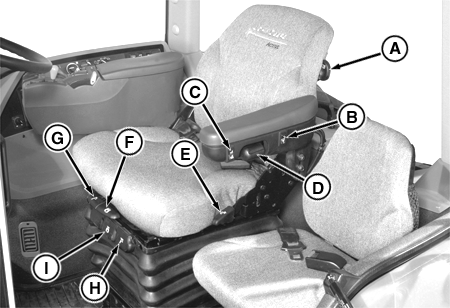
IMPORTANT: If electrohydraulic control lever is installed on COMMANDARM ™ , lever may contact right-hand console if seat is placed in full right-hand swivel position. Check seat swivel as well as seat height and fore-aft adjustment to avoid this contact. NOTE: Before operating tractor, adjust active seat to your height and weight. This will allow you to get the most from ride zone protection . Active seat has a built-in buffer at the high and low end of vertical seat travel, resulting in a much smoother ride. Lumbar Support Adjustment: Rotate lever (A) to any of five positions. Ride Firmness Control: Ride firmness switch (B) provides three different levels of seat suspension performance. Press upper portion "+" of switch for the firmest ride or lower portion "-" for the softest ride. Ride Zone Protection: The seat is ride zone protected. The seat will automatically adjust back into |
the protected zone when operator adjusts the seat height position at or near the vertical seat travel limits.
Height Adjustment: Turn key switch to ON position. Press lower portion of switch (C) to lower the seat. Press upper portion of switch to raise the seat. NOTE: Compressor continues to operate until air system is optimized for the given seat height and operator weight. For best seat performance, position seat slightly lower than usual. Armrest Height Adjustment: Turn handle (D) to adjust armrest height. Backrest Angle: Pull up handle (E) and lean on backrest to recline seat to desired angle. Seat Swivel: Lift up on handle (F) to detent position to allow seat to swivel. Push down on handle to lock seat in position. Fore-Aft Seat Position: Pull up on handle (G) to allow the seat to slide forward or backward. |
|
COMMANDARM is a trademark of Deere & Company | OURX986,00001D7 -19-22MAR05-1/2 |
|
NOTE: Fore-Aft and Lateral Movement Locks should remain in the UNLOCKED position for maximum performance. Fore-Aft Movement Lock: Push down on handle (H) to allow seat to move fore and aft. Pull up to prevent fore-aft movement. |
Lateral Movement Lock: Push down on handle (I) to allow seat to move sideways. Pull up on handle to lock seat in position. |
OURX986,00001D7 -19-22MAR05-2/2 |