Vehicle Speed Calibration (Single Beam Radar Sensor) |
|
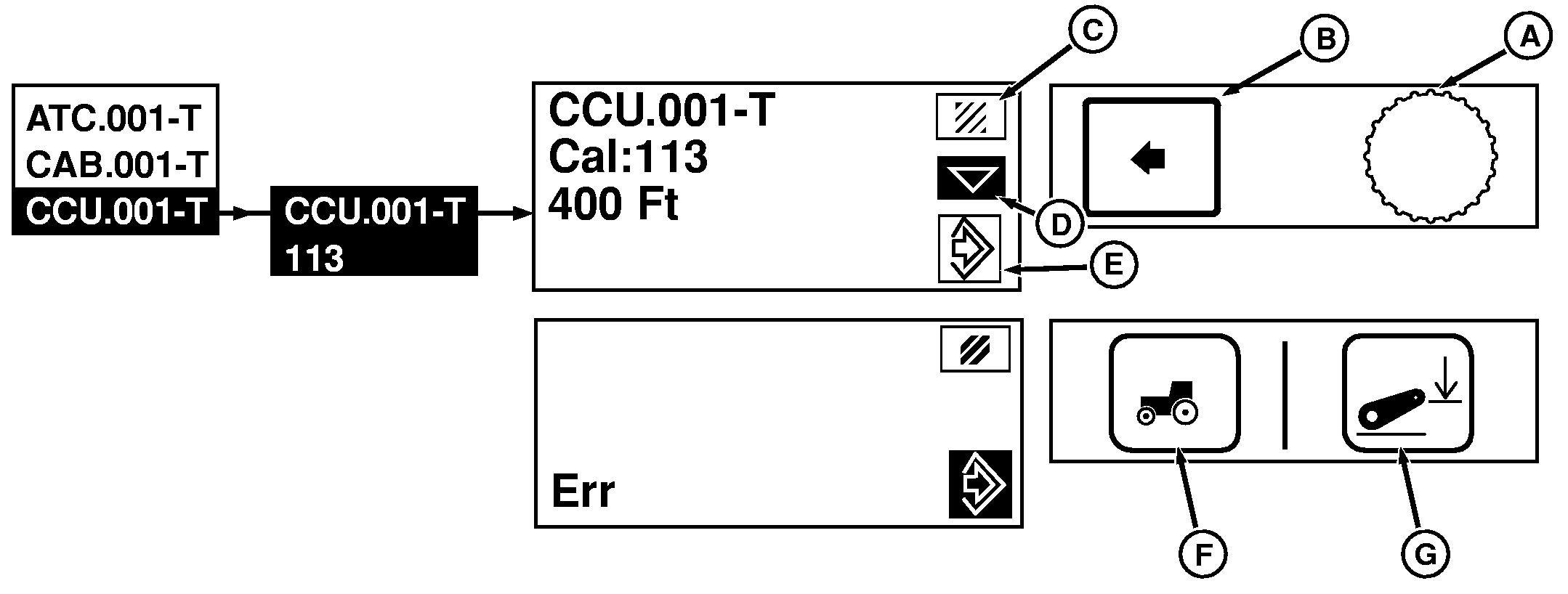
A-Command Dial
B-Select Switch
C-Cancel/Exit
D-Next/Scroll Down
E-Save/Enter
F-Settings Switch
G-Hitch Set Switch
|
NOTE: Configure tractor as needed, using ballast guidelines and install implement. On tractors equipped with single beam radar, a change in tire size or loading of tractor can cause angle of radar to change which requires recalibration. 1. Mark a 122 meter (400 ft.) straight line course, with visual indicators at the start and finish lines. Do not use tractor to measure course or calibration will not be accurate.2. Press Settings Switch (F) and Hitch Set Switch (G) switches simultaneously within 5 seconds of engine starting; CommandCenter will display a scrollable list of addresses. 3. Rotate Command Dial (A) to highlight CCU.001T and press Select Switch (B). 4. Using Command Dial, scroll through displays until 113 appears and press Select Switch. 5. Using Command Dial, highlight Next arrow (D), but do not press Select Switch. 6. Traveling at a constant speed of approximately 4.8 to 9.7 km/h (3 to 6 mph) in level field with no draft load and implement raised. Drive onto measured course, pressing Select Switch as tractor crosses start line. 7. Continue through course at same constant speed, and press Select Switch again ending calibration as tractor crosses the finish line. |
|
OURX986,0000275 -19-16AUG05-1/2 |
|
NOTE: Do not back up if end point is exceeded. Return to starting point and repeat procedure. 8. Display will show "End" if calibration was successful. if not, display will show "Err" and calibration should be performed again at a slightly faster speed, but less than 11.3 km/h (7 mph). 9. Rotate Command Dial to highlight Save (E) or Cancel (C) and press Select Switch to either enter setting into memory or cancel in preparation of another pass. The Radar will not cause a calibration Err. If Err is shown on display, check the following items to correct. 1.
Drove too slow and calibration procedure "timed out". Drive tractor at a speed between 4.8 to 9.7 km/h (3 to 6 mph).
|
OURX986,0000275 -19-16AUG05-2/2 |